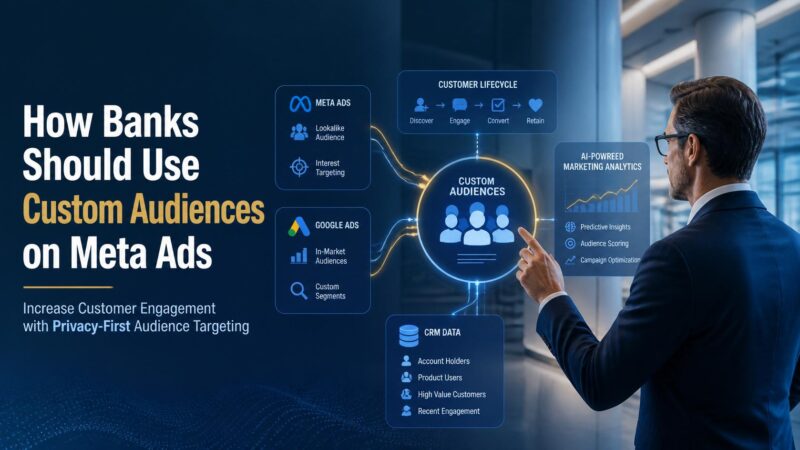
How Banks Should Use Meta Custom Audiences to Power Smarter Facebook Ads
Retail banking is one of the highest-CPA, highest-consideration verticals on Meta. Meta Custom Audiences for banks are the single biggest lever to stop paying for reach that will never convert and start paying for proven intent. This guide covers the exact audience architecture, use cases, compliance requirements, and rollout steps a bank needs to run smarter, lower-CPA Facebook and Instagram campaigns.
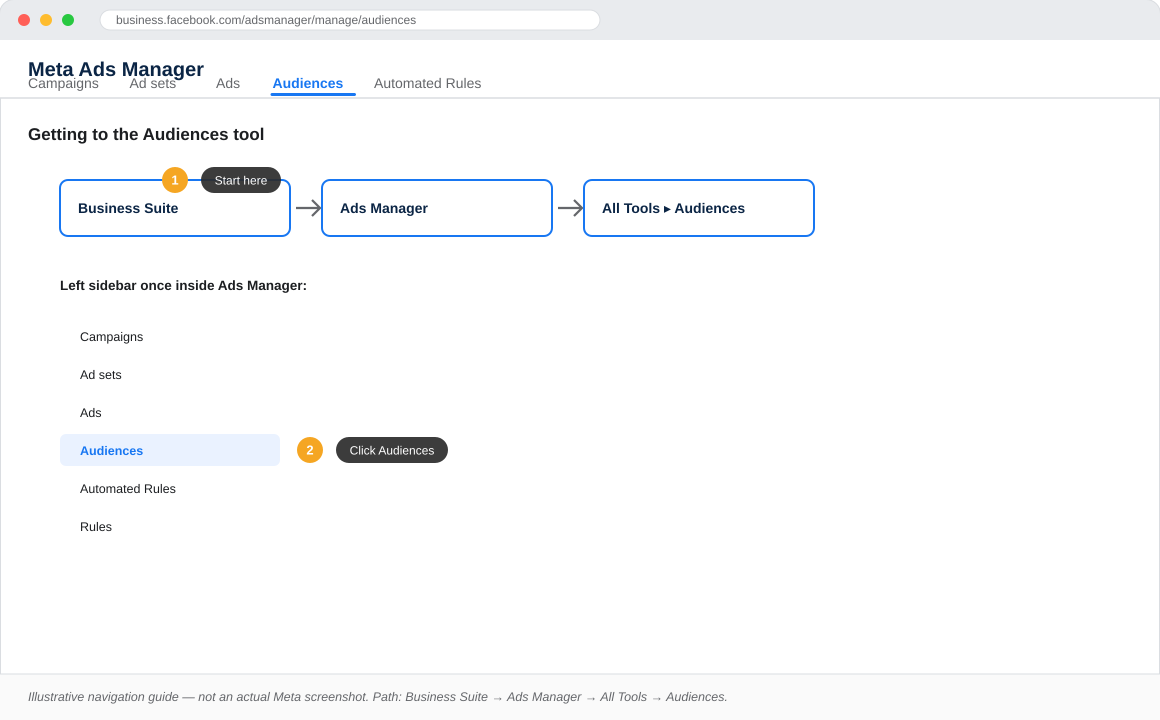
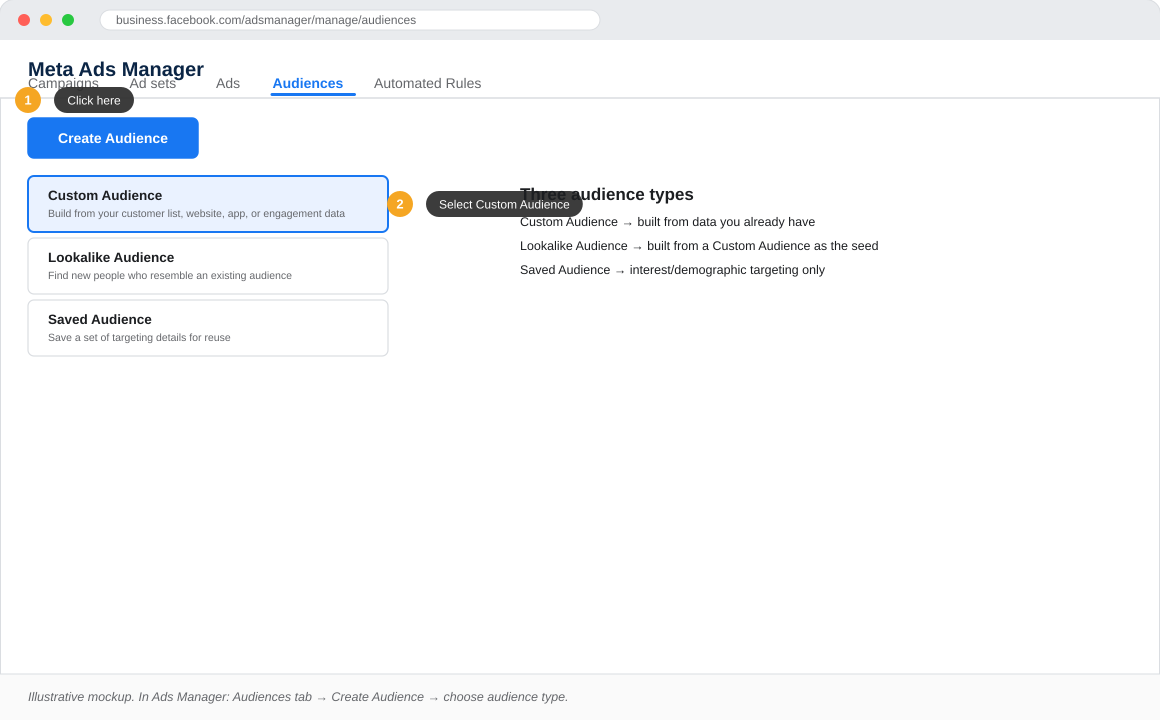
The screens in this article are illustrative navigation mockups built to match Meta Ads Manager’s current layout and terminology, not live screenshots. Meta’s interface changes frequently — always confirm exact labels against your own Ads Manager account.
Key Takeaways
Generic demographic targeting in banking drives high CPAs because intent signals are ignored entirely.
Meta supports three Custom Audience source types: customer lists, website and app activity, and engagement audiences.
Abandoned application retargeting is the highest-ROI use case available to any retail bank on the platform.
Special Ad Category rules restrict credit and loan campaigns significantly and must be declared at campaign creation.
The Conversions API is now the minimum viable tracking standard post-iOS 14.5, not an optional upgrade.
Audience refresh cadences and consent-based suppression lists are regulatory requirements, not best-practice suggestions.
Why Generic Targeting Fails Banks
Most retail banks still run Facebook and Instagram campaigns on broad interest and demographic targeting: age brackets, “finance” interests, lookalikes of a Page’s fans. On a low-consideration product this is inefficient. On a bank account, home loan, or credit card, it is expensive in a way that shows up directly in cost per approved application.
A prospect who has never visited the loan calculator, never opened the banking app, and has no relationship with the brand is fundamentally a colder lead than someone who started an application and dropped off at the KYC step. Meta’s Custom Audiences let a bank build campaigns around that difference in intent, rather than guessing at it through demographics.
The practical consequence of broad targeting in banking is a bloated top-of-funnel that costs significantly more per approved customer than a properly segmented Custom Audience strategy. Banks that have shifted from broad demographic targeting to intent-based Custom Audience architecture consistently report lower CPAs and higher application completion rates. The mechanism is straightforward: you are showing credit and account-opening offers to people who have already demonstrated some signal of interest, rather than to anyone who fits a broad age and location bracket.
The Three Custom Audience Building Blocks
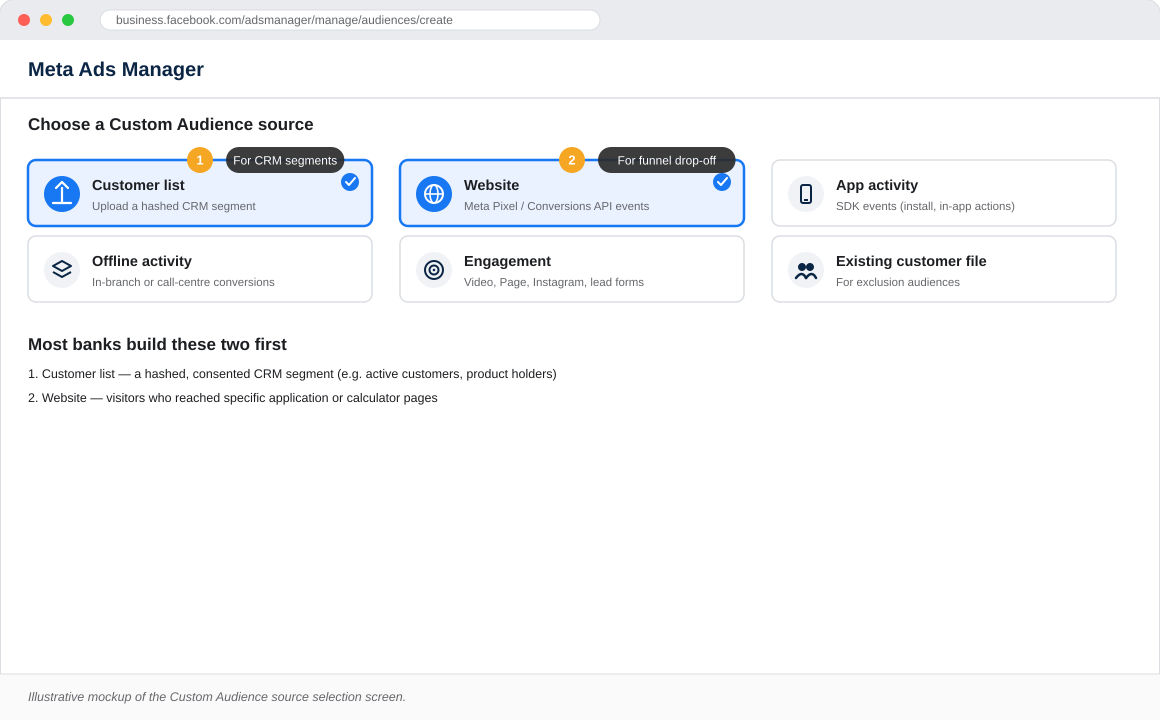
Before mapping audiences to use cases, it helps to understand the three source types Meta supports. Every campaign strategy in this guide is a combination or exclusion built from these three building blocks. Getting the foundations right determines how much flexibility you have when constructing more advanced audience segments later.
Customer List Audiences
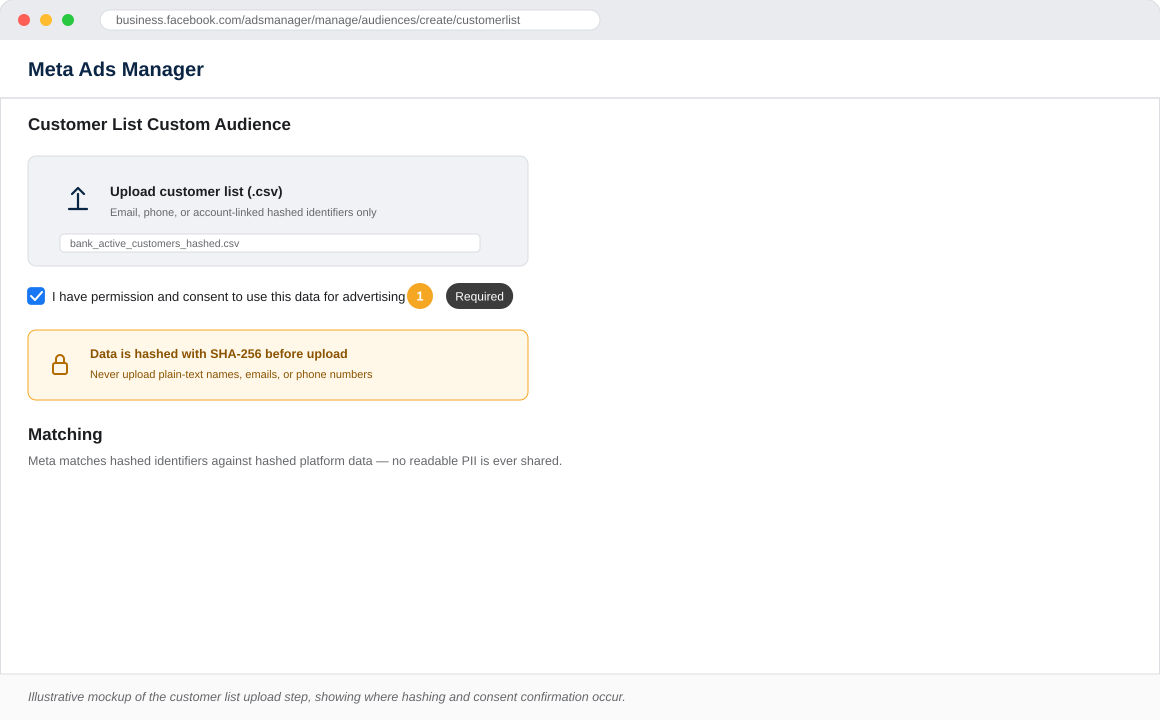
A bank uploads hashed PII (email, phone, account number) directly into Meta Ads Manager. Meta matches records against its own user graph and never exposes raw data on-platform. The quality of the seed list determines the match rate, and match rate directly determines the usable audience size. A list of 10,000 records with clean, recently verified email addresses will typically outperform a list of 50,000 records with outdated or inconsistent data. Banks should treat their CRM data quality as a media performance asset, not just an operational concern.
Website and App Activity Audiences
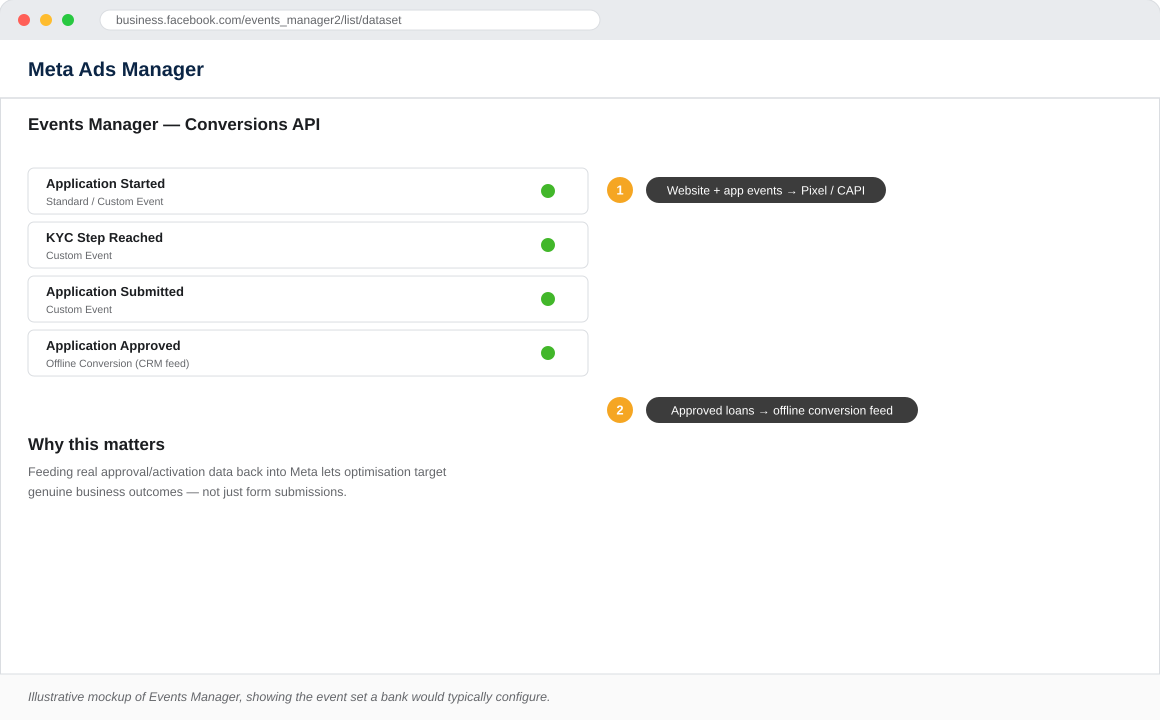
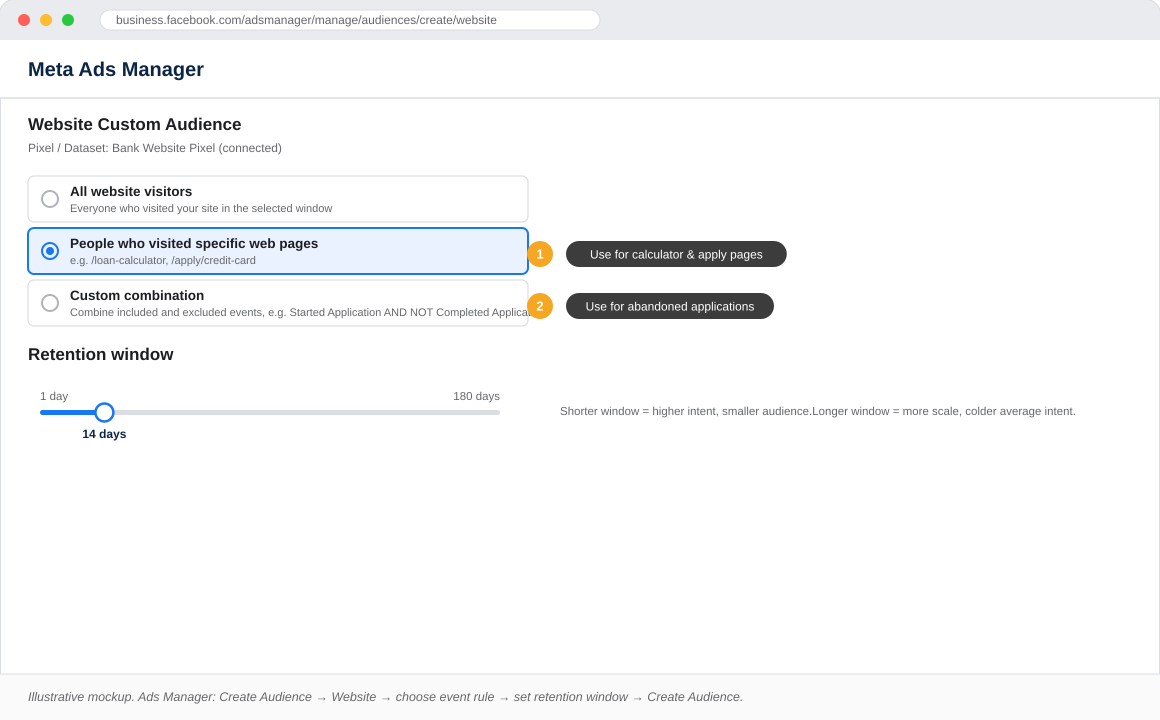
Built from the Meta Pixel and, more reliably post-iOS 14.5, the Conversions API. These audiences target visitors to specific pages (loan calculator, card comparison, account opening flow) or specific events (application started, KYC step reached, application submitted). The specificity of event tagging is what separates a mediocre retargeting strategy from a precise one. A bank that tags only general page views gets a broad retargeting pool. A bank that tags individual steps in the application funnel can build separate audiences for each drop-off point and serve messaging that addresses the specific friction at that step.
Engagement Audiences
People who watched a video past a defined threshold, opened a lead form, engaged with the bank’s Page or Instagram profile, or triggered in-app events via the Meta SDK. Engagement audiences are particularly useful for banks running awareness campaigns: a prospect who watched 50 percent of a product explainer video has demonstrated more intent than someone who merely scrolled past a static banner. Segmenting retargeting by engagement depth allows for sequenced creative strategies that move prospects progressively closer to an application.
High-Impact Use Cases for a Bank’s Media Plan
The following use cases represent the highest-ROI applications of Custom Audiences in retail banking. Each one targets a specific intent signal, reducing wasted spend on audiences that have no relationship with the product. Prioritise them in order: the first two alone can generate significant CPA reductions before any of the more advanced audience strategies are built.
Abandoned Application Retargeting
Anyone who reached the account opening or loan application flow but did not submit is the highest-intent pool available on the platform. These prospects have already made the decision to explore the product; something in the process stopped them. Retarget within seven days with objection-handling creative and a simplified CTA. The messaging should acknowledge the friction directly: application takes three minutes, funds within 24 hours, no commitment required to check eligibility. Keep the ad unit simple and the landing page frictionless. This single audience segment, properly activated, typically delivers the lowest CPA of any campaign a bank runs on Meta.
KYC Drop-Off Recovery
Prospects who completed the first form steps but abandoned at the identity verification stage represent a distinct and valuable segment. They cleared the initial intent barrier and provided personal information before stopping. The friction at KYC is almost always anxiety-driven: concern about document security, uncertainty about the process, or impatience with the time required. Reassurance-led messaging performs best here. Lead with security credentials (encryption standards, regulatory oversight), process simplicity (which documents are needed and why), and time-to-approval to overcome the anxiety that caused the original drop-off.
Pre-Approved CRM Offers
Upload a hashed segment of customers the bank has already pre-approved for a credit product. The cost per conversion for this audience is dramatically lower than any acquisition campaign because the credit decisioning is already done. The ad is not selling the product; it is delivering a notification the customer is eligible for something they can access immediately. Subject line thinking applies here: the creative should feel like personalised communication, not a generic product ad.
Lookalike from High-Value Customers
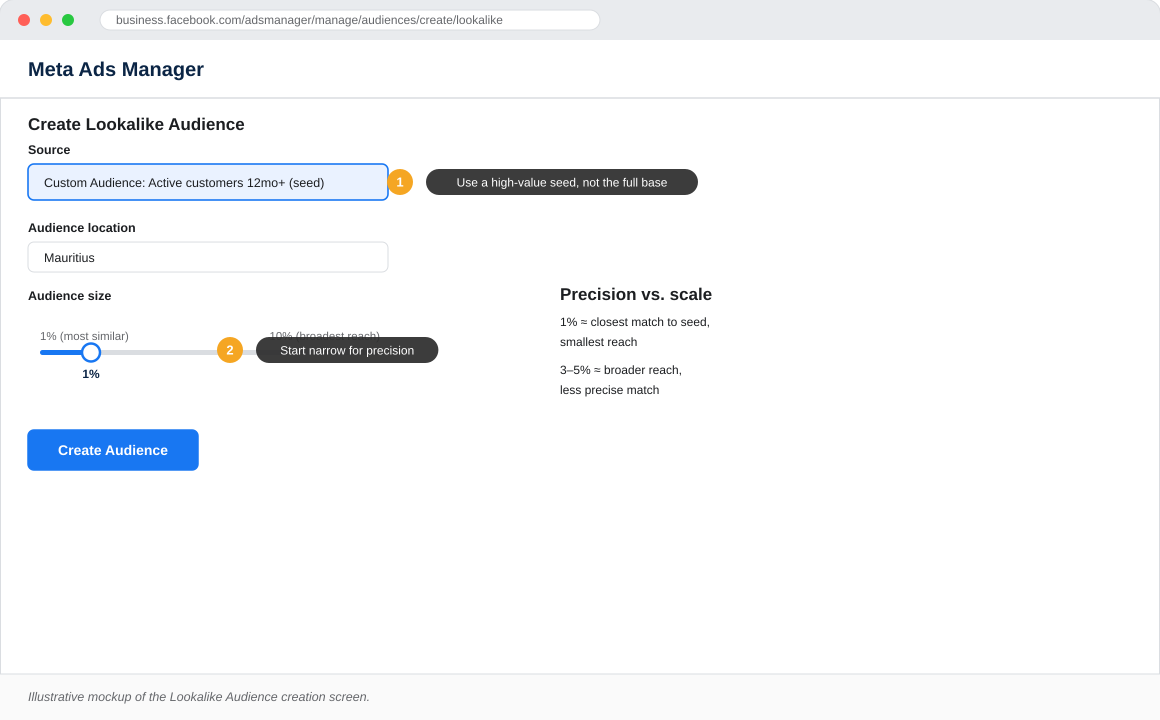
Build a 1-3% lookalike from your most active, highest-LTV customer segment, not the full customer base. The seed list quality is everything: a seed built from customers who have held a current account for three or more years, hold two or more products, and are digitally active will produce a fundamentally different lookalike than one built from all registered customers regardless of activity. Use this audience for top-of-funnel awareness rather than direct conversion. Its role is to fill the top of the funnel with people who are statistically similar to your best customers, not to close a sale on first contact.
Cross-Sell to Existing Customers
Upload a CRM segment of current account holders who do not yet hold a credit card or personal loan. Serve product-specific creative with an existing-customer offer, distinct from the acquisition creative running to cold audiences. The compliance considerations here differ slightly: you are marketing to existing customers under a pre-existing relationship, but the specific data used and the product being marketed still determine whether Special Ad Category rules apply. Always confirm with your compliance team before running credit product campaigns to existing customers via a third-party platform.
Mapping Audiences to the Funnel
Every Custom Audience should be assigned a funnel stage and a KPI before it goes live. Without this structure, teams end up judging a cold prospecting audience by conversion rate, or a bottom-funnel retargeting audience by reach, and drawing the wrong conclusions from both. The framework below maps each audience type to the stage where it belongs and the metric that should determine whether it is working.
Audience-to-Funnel Framework
01
TOFU
Awareness
Reach new prospects who mirror your highest-value customers but have no prior relationship with your brand.
Audience Source
Lookalike 1-3% from high-value customer list
Objective
Awareness & Reach
Primary KPI
CPM, Reach, Video Views
02
MOFU
Consideration
Re-engage prospects who have visited product pages, watched your videos, or interacted with your brand content.
Drive product adoption and lifetime value from your existing customer base through targeted cross-sell campaigns.
Audience Source
Existing customers via CRM upload (cross-sell segments only)
Objective
Engagement
Primary KPI
Product Adoption Rate
Each stage requires its own campaign, creative strategy, and success metric. Never mix funnel stages within the same ad set.
Compliance: The Part Banks Cannot Skip
Financial services sit in a more constrained position on Meta than most advertisers. Getting compliance wrong carries both regulatory and platform risk: accounts can be restricted, campaigns rejected, and in regulated markets, fines can follow. The constraints below are not best-practice recommendations; they are requirements. Treat them as go-live gates, not post-launch considerations.
Data Hashing and PII Handling
Never upload plain-text PII to Meta Ads Manager. Use Meta’s on-platform hashing when uploading customer lists directly, or preferably send events server-side via the Conversions API with SHA-256 hashing applied before transmission. The Conversions API approach is both more secure and more reliable: it bypasses browser-side blocking, delivers better event match quality, and gives the bank a documented server-to-server data transfer record for compliance purposes. For any bank operating under GDPR, POPIA, or equivalent frameworks, documented data handling procedures for third-party platform uploads are typically a regulatory requirement.
Consent and Suppression
Only use customer data for Meta marketing where the customer has explicitly consented under the bank’s privacy policy and the applicable data protection framework. This is not a Meta platform rule; it is a legal obligation in most markets where banks operate. Maintain a suppression list for opt-outs and sync it on every audience refresh cycle. A customer who opts out of marketing this month and receives a retargeted loan ad next month is both a compliance failure and a trust event. The suppression list should be treated as a live asset, not a batch-update file.
Special Ad Category for Credit Products
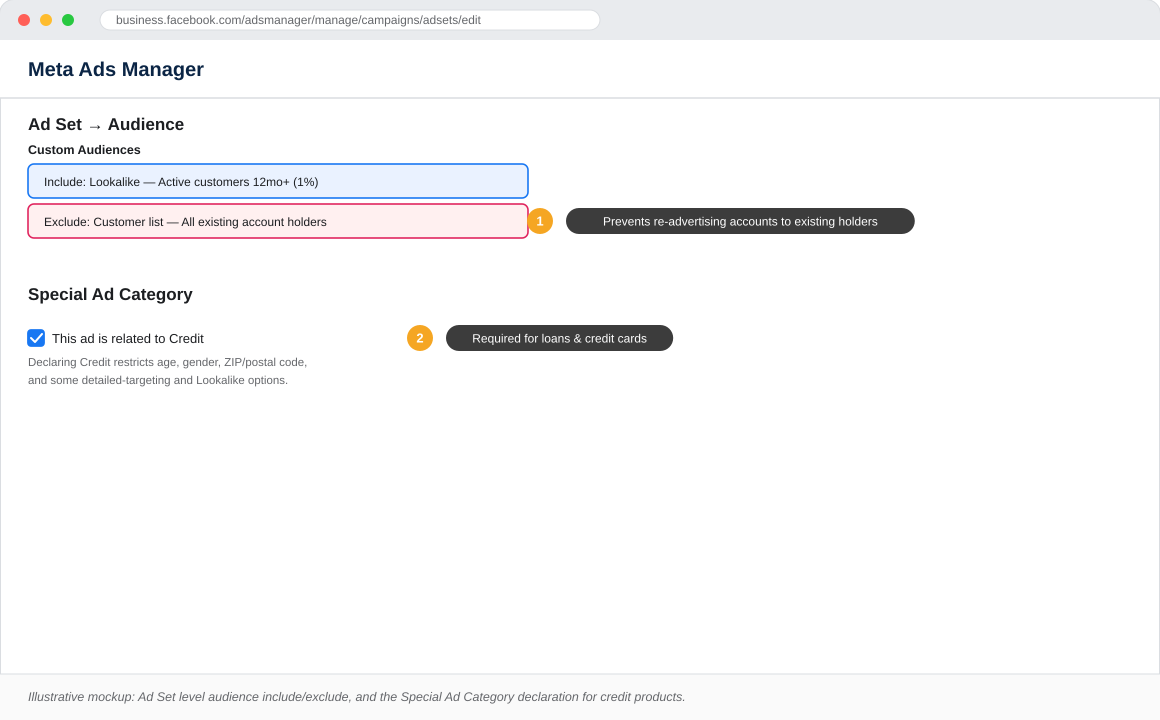
Meta requires credit, employment, and housing-related ads to be flagged under the Special Ad Category at campaign creation. This restricts targeting by age, gender, ZIP or postal code, and limits some lookalike configurations. Loan, credit card, mortgage, and overdraft campaigns typically fall under this category. The restriction must be declared at the campaign level before any ad sets are built. Attempting to correct it after launch requires recreating the campaign from scratch. Declaring incorrectly or omitting it entirely risks campaign rejection and, in repeat cases, account restriction.
Audience Refresh Cadence
Set a defined refresh and expiry cycle for all uploaded customer lists and website audiences, typically 30 to 90 days depending on the product and consent framework. Running campaigns against stale audience data is both a compliance risk and a performance problem: withdrawn-consent customers may still be receiving ads, and converted customers may still be in acquisition retargeting pools. Automate the suppression list sync wherever possible. Manual processes at the audience refresh stage are where consent violations most commonly occur.
Conversions API as the Tracking Baseline
Browser-only Pixel tracking significantly under-reports conversions in a post-iOS 14.5 environment due to tracking restrictions and browser privacy changes. Server-side event matching via the Conversions API is now the minimum viable tracking standard, not an optional upgrade. For a bank, the quality of event data directly determines how well Meta’s algorithm optimises toward approved applications rather than mere landing page clicks. A campaign optimising toward clicks with a Pixel-only setup and a campaign optimising toward approved applications with CAPI event data are fundamentally different products in terms of who gets shown the ads and what the resulting CPA looks like.
A Practical Rollout Checklist
Use this as a go-live gate for any bank launching or auditing its Custom Audience strategy on Meta. Every item on this list represents a gap that, if left open, will either drive CPA up, put the account at compliance risk, or both.
Install the Meta Pixel and Conversions API on all digital account opening, loan application, and card application flows
Define and tag key events: application started, KYC step reached, application submitted, application approved
Build an exclusion audience of existing customers for every acquisition campaign
Build a CRM-based lookalike seed from your highest-value, most active customer segment, not the full customer base
Set up an abandoned-application retargeting campaign with benefit-led, objection-handling creative within a 7-day window
Confirm Special Ad Category is correctly declared on every credit, loan, and mortgage campaign before any ad sets are created
Set a 30 to 90 day audience refresh cadence and connect it to your consent and suppression list
Feed offline conversion data (approved loans, activated accounts) back into Meta so optimisation targets real business outcomes, not landing page submissions
Document all data transfer procedures and consent records for regulatory audit readiness
Frequently Asked Questions
Can banks legally use customer data for Meta Custom Audiences?
Yes, provided the bank has obtained explicit marketing consent from customers under its privacy policy and the applicable data protection framework (GDPR, POPIA, or equivalent). The data must be hashed before upload, a suppression list for opt-outs must be maintained and synced on each audience refresh, and the legal basis for using customer data for third-party platform targeting must be documented. Banks should confirm the specific consent language in their existing customer agreements with their legal or compliance team before activating CRM-based audiences on Meta.
What is the minimum list size for a Meta Custom Audience to work?
Meta requires a minimum of 100 matched users for a Custom Audience to be usable in targeting. In practice, audiences below 1,000 matched users are too small to exit the learning phase reliably and typically result in high CPMs and unstable delivery. For lookalike audiences, Meta recommends a seed list of between 1,000 and 50,000 people, with quality prioritised over quantity. A seed of 2,000 high-value customers will outperform a seed of 20,000 mixed-quality records in almost every case.
Does the Special Ad Category restriction significantly limit campaign performance?
Yes, but the restriction is manageable with the right audience architecture. Special Ad Category prevents targeting by age range below 18, gender, ZIP or postal code, and limits some lookalike radius options. Banks that rely on Custom Audiences rather than demographic targeting are less affected by these restrictions because their audience segments are built on intent and behaviour rather than demographics. The impact is felt most on cold prospecting campaigns where lookalike configuration is limited. This is why Custom Audiences, particularly abandoned application retargeting and CRM-based segments, become proportionally more valuable under Special Ad Category constraints.
How often should a bank refresh its Meta Custom Audiences?
Website and app activity audiences refresh automatically based on the lookback window set at creation (typically 7, 14, 30, or 90 days). Customer list audiences require manual re-upload or API-based automation. Most banks run a 30-day refresh cycle as a baseline, with more frequent updates for high-velocity segments such as abandoned application retargeting. The suppression list should be updated at minimum on the same schedule and ideally in near-real-time for any customer-facing bank with active opt-out mechanisms in its digital channels.
What is the difference between the Meta Pixel and the Conversions API for banks?
The Meta Pixel is a JavaScript tag that fires in the user’s browser and sends event data to Meta. The Conversions API is a server-to-server integration that sends event data directly from the bank’s server to Meta, bypassing browser-side restrictions. Post-iOS 14.5, browser-based Pixel tracking under-reports conversions significantly because Apple’s App Tracking Transparency framework and browser privacy updates block or delay a material proportion of Pixel events. For a bank, this means a Pixel-only setup produces an incomplete and delayed picture of application completions, which causes Meta’s algorithm to optimise toward the wrong signal. The Conversions API, implemented alongside the Pixel for deduplication, is now the correct baseline for any bank running performance campaigns on Meta.
Custom Audiences do not replace a bank’s brand and awareness campaigns. They make the performance layer underneath dramatically more efficient. The banks that win on Meta in the next few years will not be the ones with the biggest budgets. They will be the ones with the cleanest event data, the most disciplined audience architecture, and the compliance foundations to activate it at scale.
If your bank is building its Meta Ads strategy from scratch or auditing an existing setup, the audience architecture decisions made in the first 90 days will determine your cost structure for years. Get the foundations right before scaling the spend.
Google AI Max: What It Is, Why It Matters, and How to Use It Before Your Competitors Do
Most advertisers are still running their Search campaigns the same way they did in 2023.
Keyword lists. Fixed landing pages. Manual copy. Same setup, same results.
The problem? Google changed the rules in April 2026, and most people missed it.
On April 15, Google moved AI Max for Search out of beta and made it available to all advertisers. No announcement. No countdown. Just a quiet shift in how Search campaigns can now work, and a growing gap between advertisers who understand it and those who do not.
This article breaks down exactly what Google AI Max is, how it works, and what you need to do this month to take advantage of it.
What Is Google AI Max for Search?
Let me be clear about one thing first.
Google AI Max is not a new campaign type. You do not create a new campaign to use it.
It is a suite of AI-powered features that plugs into your existing Search campaigns and changes how they find, match, and convert. Think of it as upgrading the engine while keeping the car.
Traditional Search campaigns rely on keyword lists to decide when your ads show. AI Max replaces that rigid system with machine learning that understands intent, context, and relevance. It surfaces your ads for searches your keyword list would never have caught, because it is not just matching words, it is matching meaning.
The headline performance number: advertisers using the full AI Max feature suite are seeing an average of 7% more conversions or conversion value at a similar CPA or ROAS compared to search term matching alone.
That compounds over time. And it means advertisers not running AI Max are leaving performance on the table every single day.
The 4 Core Features of Google AI Max
1. Expanded Search Term Matching
This is the biggest change, and it is worth understanding properly.
AI Max uses a combination of broad match and keywordless targeting to find relevant searches beyond your existing keyword list. It analyzes the user’s search query, their recent search history and context, the content of your landing pages, and your existing ads and assets.
The result is simple: your ads show up for high-intent searches you would never have thought to bid on. That is where the extra conversion volume comes from.
Here is the critical part: you keep control. Negative keywords still work. Your existing keyword structure stays intact. AI Max works alongside it, not instead of it.
2. Dynamic Ad Copy Generation
AI Max writes your headlines, descriptions, and calls to action automatically. It pulls from your website content, your existing ads, and real-time user intent signals. And it keeps iterating based on what actually converts.
The smarter feature here is the AI Brief tool. This is a plain-English prompt where you tell the AI what to emphasise, what to avoid, and what messaging angle to take. You are not handing the wheel to the algorithm completely. You are setting the guardrails and letting it drive within them.
For brand-conscious advertisers, this is important. Use the AI Brief. Do not skip it.
3. Final URL Expansion
This one solves a problem most advertisers do not realise they have.
Instead of sending every click to the same fixed landing page, AI Max dynamically selects the most relevant page on your website based on what the user searched for. Someone searching for a specific product goes to that product page. Someone earlier in the research phase goes to an educational page.
Sending the wrong person to the wrong page is one of the most common CPA killers in paid search. AI Max fixes it without you having to build out hundreds of ad groups.
4. Locations of Interest
This is a newer feature added at the ad group level, and it is a precision lever that did not exist before.
It lets you target users based on where they are interested in geographically, not just where they are physically located. A travel brand in the UK can target users researching trips to Mauritius, regardless of where those users are sitting right now. A property developer can target users showing intent around a specific city without restricting by physical location.
For international advertisers, this changes the game.
Google AI Max vs. Performance Max: What Is the Difference?
Every advertiser asks this question. Here is the clear answer.
Performance Max runs across all Google channels: Search, Shopping, Display, YouTube, Gmail, Discover. It is a full-funnel, cross-channel campaign. By early 2026, Performance Max was driving 45% of all Google Ads conversions.
AI Max for Search stays in Search. It enhances your keyword campaigns with AI capabilities, but it keeps the channel focus and the transparency that Performance Max trades away.
With AI Max, you keep your keyword structure and negative lists
You still see search term reports
You can observe what queries are triggering your ads
Performance Max is still more of a black box
For direct response, lead generation, and high-intent B2B, AI Max for Search is the right tool. Performance Max suits full-funnel ecommerce and brand building. Use both, but know what each one is optimising for.
The Deprecation Timeline You Cannot Ignore
AI Max is not optional in the long run. Google has set a clear migration path:
September 2026: Campaigns using Automatically Created Assets and campaign-level broad match will automatically upgrade to AI Max
January 2027: Creating new Dynamic Search Ads (DSA) campaigns will no longer be possible
February 2027: All existing DSA campaigns will be automatically migrated to AI Max
If you are running DSA campaigns right now, you have a window. Use it to understand AI Max before the migration happens to you rather than by you.
The August 17 Deadline That Could Hurt Your Campaigns
Separate from AI Max, Google is enforcing a new rule on August 17, 2026.
From that date, campaigns that are budget-limited and running tCPA or tROAS targets that are out of line with actual performance will face stricter enforcement. Google released a Bid Target Adjustment Tool on July 6, 2026, specifically to help advertisers prepare. Use it now, before it becomes urgent.
What You Should Do Right Now
Activate AI Max on your top Search campaigns. Start with your highest-volume, best-converting campaigns. Enable all three features: search term matching, text customisation, and Final URL expansion. Give it two to three weeks before drawing conclusions.
Set up your AI Brief immediately. Define your messaging guardrails. Tell it what to emphasise and what to stay away from. This is where brand consistency lives.
Audit your DSA campaigns now. Map each DSA campaign to its AI Max equivalent. Plan the migration yourself rather than waiting for Google to force it in February 2027.
Run the Bid Target Adjustment Tool before August 17. Check every budget-limited campaign and adjust your tCPA and tROAS targets to reflect what is actually achievable.
Check your landing page structure. Final URL expansion only performs well if your site is properly organised. Make sure your key pages are relevant, well-structured, and indexed.
Final Thoughts
Google AI Max is not a gimmick. It is the direction paid search is heading, and the advertisers who understand it now are building an advantage that will be hard to close six months from now.
The 7% conversion uplift is real. The deprecation timeline is set. The August deadline is weeks away.
The question is simple: are you ahead of this, or are you going to be reacting to it?
If you want to talk through how AI Max fits into your current campaign structure, get in touch.
Human-First Content in the Age of AI: Why Your Expertise Is Your Greatest Marketing Asset
The Great Content Paradox of 2026
AI has made content creation cheaper and faster than ever before. Anyone can generate a 1,500-word article on any topic in seconds. The result? The internet is flooded with competent, accurate, indistinguishable content, and audiences, algorithms, and AI systems alike are desperately searching for something that feels real.
Genuine human expertise, lived experience, hard-won insight, opinions earned through practice, has never been more scarce or more valuable.
This is the great content paradox of 2026: the technology that made content creation effortless has simultaneously made authentic content the most defensible competitive advantage in digital marketing.
What Google’s E-E-A-T Framework Actually Means
Google’s quality evaluator guidelines have long referenced E-A-T (Expertise, Authoritativeness, Trustworthiness). In 2022 they added a second E: Experience. In 2026, the enforcement of this framework has intensified significantly as Google deploys increasingly sophisticated AI to evaluate content quality.
Experience: Has the content creator actually done the thing they’re writing about? First-hand experience, case studies, personal results, documented outcomes, signals authenticity that AI-generated content structurally cannot replicate.
Expertise: Does the creator demonstrate deep, specific knowledge that goes beyond surface-level information? Genuine expertise produces insights that are non-obvious, nuanced, and grounded in real understanding rather than synthesised generalities.
Authoritativeness: Is the creator recognised by others in their field? Citations, mentions, links from credible sources, and consistent public-facing credentials build the external validation signals that establish authority.
Trustworthiness: Is the content accurate, transparent about limitations, and free from misleading claims? Trust signals include clear authorship, transparent affiliations, cited sources, and a track record of accuracy.
Content attributed to verified expert authors with documented credentials consistently outperforms anonymous or generic brand content, not marginally, but substantially. Pages with clear author bios linking to established professional profiles, published in contexts with editorial standards, and supported by external mention signals are winning the rankings that matter. Personal brand investment is SEO investment.
Why Personal Brand Is Now a Business Infrastructure Decision
For consultants, agency founders, and senior practitioners, this shift has a direct strategic implication: your personal expertise, publicly documented, is a business asset with measurable ROI.
Every speaking engagement, every published article, every case study with real results, every client testimonial, these aren’t just reputation signals. They’re E-E-A-T signals. They tell search engines and AI systems that you are a genuine authority whose content should be surfaced to people seeking expertise in your domain.
Building a Human-First Content Strategy
Lead with your actual experience. Every piece of content should answer: what do I know about this that someone who hasn’t done it wouldn’t know? Your years of performance marketing across international consultancies is a content asset. Use it. The specific, the concrete, the counter-intuitive, these are the signals that distinguish human expertise from AI synthesis.
Document your results, not just your opinions. Case studies with real numbers are among the highest-value content assets you can produce. They demonstrate experience, establish credibility, and provide the specific, verifiable information that AI systems cite and search engines reward.
Build your author entity deliberately. Ensure your professional profile is consistent, detailed, and cross-referenced across LinkedIn, your website, industry publications, and social platforms. Your name should be a clearly defined entity in the semantic web, associated with specific expertise, verified credentials, and documented outcomes.
Invest in genuine thought leadership. Not content marketing dressed up as thought leadership, actual positions, informed by real data and experience, on questions your industry is actively debating. The willingness to take a specific, reasoned stance is one of the clearest human signals in content.
The Strategic Opportunity in the AI Content Flood
Here’s the counterintuitive reality: the flood of AI-generated content is actually an opportunity for experts. When everyone else is producing generic, averaged, synthesised content, genuine expertise stands out sharply. The bar for differentiation through authentic human insight has never been lower, because most brands are abandoning it.
The practitioners who understand this and invest in documented, experience-driven thought leadership in 2026 are positioning themselves ahead of a market that will, inevitably, course-correct toward valuing authenticity again.
Be ahead of that curve. Not because it’s fashionable, because the data says it works.
Zero-Party Data: The Marketing Currency That Actually Belongs to You
The Cookie Is Dead. Long Live the Relationship.
Third-party cookies, the invisible trackers that powered a decade of digital advertising, are gone. Google completed their deprecation in 2024. What followed was exactly what privacy advocates predicted and what unprepared marketers feared: a significant erosion of audience targeting precision and attribution capability for brands that hadn’t built alternative data foundations.
The brands that prepared didn’t just survive the transition. They thrived.
Understanding the Data Hierarchy
Third-party data: Collected by someone else, purchased or licensed. Gone or severely restricted.
Second-party data: Another company’s first-party data, shared through a partnership. Limited and expensive.
First-party data: Data you collect directly from your audience, website behaviour, purchase history, email engagement.
Zero-party data: Data your audience intentionally and proactively shares with you, preferences, intentions, personal context.
Zero-party data is the most valuable because it’s the most accurate. There’s no inference, no modelling, no approximation. When a customer tells you directly that they prefer sustainable products, are planning a purchase in the next 30 days, and have a budget of €500, that signal is infinitely more actionable than any behavioural proxy.
The most accurate audience data has always been what customers tell you directly. Third-party cookies were a workaround born from the industry’s failure to build genuine relationships with its audiences. The cookie deprecation didn’t create a data problem. It revealed one that was always there: most brands had no real relationship with their customers. Zero-party data strategy is really a relationship strategy, and the brands getting it right are seeing not just better targeting, but meaningfully higher customer lifetime values.
Building a Zero-Party Data Engine
Preference Centres and Onboarding Flows
Give customers a clear, simple way to tell you what they care about. Not a legal checkbox, a genuine preference hub. What topics interest them? How often do they want to hear from you? What are they currently looking for? This data flows directly into personalisation.
Interactive Content
Quizzes, assessments, configurators, and calculators provide genuine value to the user while collecting declared preference data. A skincare quiz that recommends a personalised routine collects skin type, concerns, and budget, all zero-party data, in exchange for a useful outcome.
Loyalty and Membership Programmes
Progressive data collection through loyalty programmes is exceptionally effective. Each interaction, a purchase, a review, a preference update, adds to your zero-party data profile. The key is ensuring customers understand and value the exchange.
Conversational AI and Chatbots
AI-powered conversations are now one of the most efficient zero-party data collection mechanisms. A well-designed chat interaction can surface intent, preferences, and decision criteria in a natural exchange that customers find helpful rather than intrusive.
Activating Zero-Party Data
Feed zero-party signals into ad platforms via Customer Match and Custom Audiences to reach similar high-intent audiences
Use declared preferences for email segmentation, dramatically outperforming behavioural segmentation alone
Inform product development, zero-party data tells you what customers actually want, not just what they clicked on
Power personalised web experiences, preference data enables landing page and product recommendation personalisation without cookies
The Competitive Advantage Window
Brands that have built sophisticated zero-party data programmes now have a durable competitive advantage. They have audience data their competitors cannot buy, borrow, or scrape. That moat grows with every consented interaction.
The window to build this advantage is narrowing as the practice becomes more widespread. 2026 is still early enough to establish a meaningful lead.
Hyper-Personalisation at Scale: How AI Is Delivering the Right Message at the Right Millisecond
Beyond Segmentation: The Era of the Segment of One
Traditional personalisation divided audiences into segments, broad buckets of people who shared some characteristics. Messaging was tailored to the bucket. In 2026, AI has collapsed the segment size to one.
Every individual user can now receive a version of your message, in the right format, at the right moment, on the right platform, with the right creative, built specifically for them. Not their demographic. Them.
This is hyper-personalisation at scale, and it’s no longer a capability reserved for tech giants with custom ML infrastructure. It’s available through the platforms you’re already using.
How It Works in Practice
The mechanics are built on three interconnected AI systems working simultaneously:
Signal ingestion: AI continuously reads behavioural signals, what content a user engages with, their purchase history, browsing patterns, device, location, time of day, and cross-platform activity. This builds an individual behavioural profile that updates in real time.
Predictive intent modelling: Based on accumulated signals, AI predicts what a specific person is most likely to need or want in this precise moment, not based on who they are demographically, but on what their current behavioural pattern suggests.
Dynamic creative delivery: The right message, sometimes AI-generated on the fly, sometimes selected from a creative library, is matched to that predicted intent and delivered at the moment of highest receptivity.
The performance differential between segment-based and individual-level personalisation is measurable and significant. Campaigns leveraging true behavioural personalisation consistently show 40 60% higher engagement rates and 25 35% better conversion rates compared to segment-based approaches. The critical variable is data quality, garbage signals produce irrelevant personalisation that actively damages brand perception.
Where Hyper-Personalisation Is Having the Biggest Impact
Email marketing: AI-driven send-time optimisation, subject line personalisation, and dynamic content blocks are lifting open rates by 20 30% for brands doing it well. Every element of the email, from the hero image to the CTA, adapts to the individual recipient.
Paid social: Meta’s Advantage+ Creative automatically adapts ad creative, testing different text, images, and formats, for different users within the same campaign. Combined with Dynamic Product Ads, every user sees the most relevant products in the most engaging format for them.
Website experience: Personalised landing pages, dynamic hero content, and AI-curated product recommendations are significantly reducing bounce rates and improving on-site conversion.
Conversational AI: Chatbots and AI assistants now maintain context across interactions, remembering preferences and purchase history to deliver genuinely helpful, personalised guidance rather than generic scripts.
The Strategic Shift Required
Creative production at volume: You need more raw creative assets, not fewer. AI needs material to work with. Invest in modular creative systems, interchangeable headlines, visuals, and CTAs that can be assembled in thousands of combinations.
First-party data infrastructure: Hyper-personalisation depends on quality data signals. Build your first-party data collection systematically, email lists, CRM integration, loyalty programmes, preference centres.
Measurement evolution: Last-click attribution is useless for evaluating personalisation impact. Move to multi-touch attribution and incrementality testing to understand the real contribution of personalised experiences.
Privacy by design: With personalisation comes responsibility. Explicit consent, transparent data use, and clear value exchange for data sharing are not just legal requirements, they’re brand trust investments.
GEO: Why Generative Engine Optimisation Is the Most Important Skill in Marketing Right Now
Search Has Changed Forever
Remember when getting to page one of Google was the goal? That’s no longer the finish line. In 2026, millions of search queries never reach page one, they’re answered directly by AI. Google’s AI Overviews, ChatGPT’s search function, Perplexity, Gemini, these platforms synthesise information from across the web and deliver a complete answer before the user ever sees a list of links.
If your brand, product, or expertise isn’t being cited in those AI-generated answers, you’re invisible to a growing segment of your audience.
The Traffic Data Is Already Telling the Story
Studies tracking search behaviour in 2026 show that queries answered by AI Overviews have click-through rates to organic results as low as 18%, compared to 45%+ for standard results pages. For informational queries, the impact is even more severe: top-ranking pages are seeing 30 40% organic traffic declines as AI Overviews satisfy intent directly.
This is not a temporary SEO disruption. It’s a structural redistribution of information access.
What GEO Actually Means
Generative Engine Optimisation is the practice of structuring your content so that AI systems, not just traditional search engines, can accurately understand, trust, and cite it in their generated responses.
The key difference from traditional SEO: you’re no longer just trying to rank for keywords. You’re trying to become a source that AI systems reference when constructing authoritative answers.
GEO is essentially trust architecture. AI systems cite content that demonstrates clear expertise, factual accuracy, and structured data signals. The brands winning at GEO aren’t just creating good content, they’re building information systems: structured FAQs, clear entity definitions, schema markup, and content that directly answers the specific questions AI systems are trained to respond to. It’s less about volume and more about precision.
The Four Pillars of Effective GEO
1. Structured Data and Schema Markup
AI systems love structured information. Implement Schema.org markup comprehensively, Organisation, Person, Article, FAQ, HowTo, Product. Make it easy for AI crawlers to understand exactly who you are, what you do, and why you’re authoritative.
2. Entity-Based Content Architecture
Traditional SEO targets keywords. GEO targets entities, the people, places, organisations, and concepts that AI systems have built knowledge graphs around. Position your brand, your key people, and your core services as clearly defined entities with consistent information across all web properties.
3. Direct Answer Content
AI systems are trained to find and synthesise the most direct, accurate answer to a query. Create content that front-loads the answer, lead with the key point, then expand. Long, meandering articles that bury the lede don’t get cited.
4. Citation Credibility Signals
Be where authoritative sources are. Earn mentions in industry publications, be referenced in Wikipedia, build consistent NAP signals, and ensure your brand appears across multiple credible sources on the same topics.
Practical GEO Actions for 2026
Audit your top 20 pages for structured data gaps
Create a comprehensive FAQ section covering every core question in your niche
Build a clear “About” page that reads like an entity definition, who you are, what you do, credentials, notable clients, locations
Target featured snippet positions, they correlate strongly with AI Overview citations
Monitor your brand’s appearance in AI Overviews using tools like SE Ranking or BrightEdge
Why This Matters More for Personal Brands
For consultants and thought leaders, GEO is an enormous opportunity. AI systems heavily favour expert individuals with clear, documented expertise over generic brand content. If you have genuine credentials, real case studies, and consistent thought leadership content, you can compete with much larger organisations for AI citation visibility.
Your name, your specialisation, and your documented results are GEO assets. Treat them that way.
AI Agents Are Taking Over Campaign Management, And That’s a Good Thing
The Shift Nobody Saw Coming (Until It Was Already Here)
Digital marketing has always been a game of speed, who can analyse faster, optimise quicker, and act on signals before the competition does. In 2026, that game has fundamentally changed. AI agents aren’t just tools marketers use. They’re active participants in campaign execution, making thousands of micro-decisions every hour that no human team could replicate at scale.
This isn’t automation. Automation follows rules you set. AI agents learn, adapt, and act, without you being in the room.
What AI Agents Actually Do in a Campaign
The clearest examples are already in your existing platforms. Google’s Performance Max and Meta’s Advantage+ aren’t just smart bidding tools anymore, they are fully autonomous campaign systems. Feed them a goal, a budget, and creative assets, and they handle everything else: audience targeting, placement selection, bid adjustments, creative rotation, and real-time reallocation across channels.
What’s changed in 2026 is the sophistication. These agents now:
Predict conversion probability at the individual user level before the auction even happens
Generate and test creative variants in real time, retiring underperformers within hours
Reallocate budget mid-flight across campaigns, channels, and geographies based on live performance signals
Identify audience segments that human planners would never have isolated, micro-cohorts defined by cross-platform behavioural patterns
The Performance Data Behind the Shift
The numbers are compelling. Brands running fully AI-managed campaigns through Performance Max are reporting 20 35% lower CPAs compared to manually managed equivalents, with significantly higher conversion volumes at the same budget. Meta’s internal data shows Advantage+ shopping campaigns delivering 32% better return on ad spend than standard campaigns on average.
The performance gap between AI-managed and manually-managed campaigns is widening every quarter. This isn’t a temporary spike, it’s structural. The AI systems have access to signal volumes that no human analyst can process: cross-platform behavioural data, real-time auction dynamics, seasonality micro-patterns. The agencies still building campaigns the traditional way aren’t just less efficient, they’re operating with a fundamental information disadvantage.
What This Means for Marketing Professionals
The fear that AI will replace marketers misses the point. AI agents are replacing the execution layer, the manual, repetitive, data-processing work. What they cannot replace is strategic judgment: understanding client business objectives, identifying genuine market opportunities, and knowing when an AI recommendation reflects a pattern in data that doesn’t apply to the real-world context.
The marketers winning in 2026 are those who have repositioned themselves as AI orchestrators, setting the strategic parameters, interpreting AI outputs with business intelligence, and identifying where human creativity and insight still have an edge.
How to Adapt Your Practice Now
Audit your campaign structure, Are you still building campaigns the way you did in 2022? Manual audience segmentation and rigid ad group structures actively fight against AI optimisation. Consolidate.
Feed the machine better inputs, AI agents are only as good as the data and creative assets you give them. First-party data integration, strong creative diversity, and clear conversion signals are now your primary levers.
Shift your KPIs, Stop optimising for CTR and CPM. AI agents don’t care about those. Set business-level outcomes (revenue, profit margin, customer lifetime value) and let the agents find the path.
Build an AI testing framework, Systematic testing of AI agent configurations, creative inputs, and bidding strategies is the new A/B testing. Document what works and why.
The Bottom Line
AI agents aren’t the future of digital marketing, they’re the present. The question isn’t whether to use them. It’s whether you’re using them strategically or just switching them on and hoping for the best. The gap between those two approaches is measured in ROAS points and client retention rates.
Mastering Facebook Ads Manager: Tips for Effective Campaigns
Unlock the full potential of Facebook Ads Manager with this practical guide, from account setup to advanced targeting, budgeting, and analytics. Built for marketers who want results, not theory.
Meta’s advertising ecosystem spans Facebook, Instagram, Messenger and Audience Network
Understanding the Facebook Ads Ecosystem
Navigating the Facebook Ads ecosystem can seem daunting at first, but understanding its structure is the first step to mastering it. Facebook’s advertising landscape spans Facebook, Instagram, Messenger, and the Audience Network, each with unique features and audience demographics that let you tailor campaigns for maximum impact.
Facebook Ads Manager is the central hub for creating, managing, and analysing your campaigns across all these platforms. It’s designed to be user-friendly yet powerful, with tools to help you target the right audience, set budgets, and measure performance. The platform’s algorithm considers user behaviour, engagement rates, and ad relevance to determine which ads reach which users, understanding this is key to getting results.
Setting Up Your Facebook Ads Account
A correctly configured Ads account is the foundation of every effective campaign
Before creating your first campaign, you need to set up your Facebook Ads account correctly. Start by accessing Facebook Business Manager, the parent platform for all Facebook business tools, including Ads Manager.
Inside Business Manager, navigate to Ad Accounts and click Create New Ad Account. Fill in your business name, time zone, and currency, double-check these, as they affect how performance is reported and how you’re billed. Then add your payment method (credit card, PayPal, or direct debit depending on your region).
Finally, set up team roles: Admin, Advertiser, and Analyst each have different access levels. Assigning the right roles keeps your account secure while allowing your team to collaborate efficiently.
Key Features of Facebook Ads Manager
Ads Manager packs several powerful features you should know inside out:
Audience Insights, deep demographic, interest, and behaviour data to inform your targeting
Ad Creation Tool, step-by-step guidance through formats: image, video, carousel, collection, and more
Analytics & Reporting, track reach, engagement, conversions, and ROAS; build custom reports; set automated alerts
Real-time analytics let you make data-driven optimisation decisions throughout the campaign
Creating Your First Ad Campaign
Every campaign starts with choosing an objective, the goal you want Facebook’s algorithm to optimise for. Common objectives include:
Brand Awareness
Traffic
Engagement
Lead Generation
Conversions
Your objective must align with your business goal. Once selected, you move to the ad set level, where you define your audience, placements, budget, and schedule. Then at the ad level, you upload creative assets, write copy, and set your call-to-action. Review everything, then hit Publish.
Targeting Your Audience Effectively
Precision targeting means your budget reaches people most likely to convert
Targeting is where Facebook advertising gets its real edge. Build your audience in layers:
Custom Audiences, upload your customer list, retarget website visitors or app users
Lookalike Audiences, Facebook finds users who share traits with your best customers
The golden rule: a smaller, highly targeted audience outperforms a large, unfocused one every time.
Budgeting and Bidding Strategies
The right budget type and bidding strategy depends on your campaign objective and experience level
Facebook offers two budget types:
Daily Budget, a fixed amount spent each day; good for ongoing campaigns
Lifetime Budget, total spend distributed across the campaign duration; good for fixed-period promotions
For bidding, beginners should start with Automatic Bidding, Facebook optimises bids to get the most results at the best price. Once you understand your cost metrics, move to Manual Bidding to set maximum CPA or CPM targets. For e-commerce, Value-Based Bidding optimises toward the highest-value conversions, maximising ROAS.
Analysing Campaign Performance
Data is your competitive advantage. Inside Ads Manager, customise your dashboard to surface the KPIs that matter most: reach, impressions, CTR, CPC, conversions, and ROAS. Create saved custom reports for weekly reviews, and set automated alerts for significant metric changes so nothing slips through.
The most underused feature? A/B Testing (Split Testing). Test one variable at a time, ad creative, copy, audience, or placement, let the data tell you what works, and double down on the winner. This iterative approach is how experienced advertisers continuously improve performance.
Common Mistakes to Avoid
These three mistakes cost advertisers money every day:
No clear objective, without a defined goal, you can’t measure success or optimise toward it
Poor audience targeting, broad audiences waste budget; take time to layer your targeting properly
Set it and forget it, Facebook’s algorithm and user behaviour shift constantly; review performance weekly and adjust
Next Steps
Mastering Facebook Ads Manager is a progression, not a one-time setup. Start with a clear objective, build a targeted audience, monitor your analytics, and run A/B tests consistently. Each campaign teaches you something new about your audience and what drives them to act.
The advertisers who win on Meta are the ones who treat every campaign as a learning opportunity. Follow the framework in this guide, stay data-driven, and your results will compound over time.
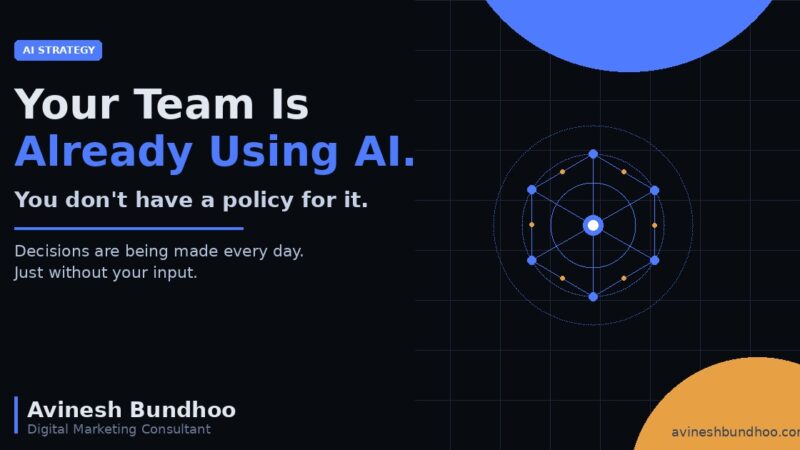
Your Team Is Already Using AI. You Just Don’t Have a Policy for It.
Most companies are moving fast with AI. Almost none of them have a policy for it.
Your team is already using ChatGPT, Gemini, Copilot, and a dozen other tools to get work done faster. That is a good thing. But without a clear framework around it, you are also making decisions you do not know you are making: which tools are approved, what data can be uploaded, who owns the output, and how you handle client confidentiality when an employee pastes a brief into a free account.
These are not theoretical questions. They are decisions being made inside your business every day, just without your input.1
Here is how to change that.
Start With a Tool Audit
Before you write a single rule, find out what your team is actually using. Send a short anonymous survey or have a direct conversation. You will likely discover five to ten AI tools being used across your organisation that you did not formally approve.2
Categorise each tool into three buckets: approved for all use, approved with restrictions, and not permitted. This becomes the foundation of your policy.
Define What Data Can and Cannot Be Used
This is the highest-risk area for most businesses. The rule of thumb is simple: if it would be confidential in an email, it is confidential in a prompt.
Set clear written rules around the following:
Client names, briefs, and campaign data must not be entered into free-tier AI tools
Internal financial data and HR information must stay out of all third-party AI systems unless the provider has a signed data processing agreement
Paid or enterprise tiers of AI tools, where data is not used for model training, are generally safer for sensitive work3
If your team does not know the difference between a free ChatGPT account and ChatGPT Enterprise, that gap alone is worth addressing immediately.
Clarify Who Owns AI-Generated Output
This matters more than most businesses realise. If a team member uses AI to write a proposal, a strategy deck, or client-facing content, the question of ownership and liability is not always straightforward.4
Your policy should state clearly that all AI-generated output must be reviewed and edited by a human before it is shared internally or externally. One person should be accountable for every piece of work, regardless of how it was produced.
Set Up an Escalation Process
Not every situation will fit neatly into the rules you write today. New tools will emerge. Edge cases will come up. Your team needs to know who to ask when they are unsure.
Designate one person as your internal AI point of contact. That could be a department head, a digital lead, or a founder in a smaller team. The goal is to make it easy for people to raise questions rather than quietly make the wrong call.
Keep It Short and Communicate It Clearly
A 40-page document will not be read. A three-page policy covering approved tools, data handling rules, and escalation steps will be.5
Share it during onboarding. Revisit it every six months. The AI landscape changes quickly and your policy should keep pace.
The Window Is Still Open
The companies that build this framework now will not be in the headlines in 2027 for the wrong reasons. The ones that wait will.
You do not need a legal team or a six-month project to get started. You need a clear decision about what is acceptable, written down, and shared with your team. That alone closes the most serious gaps.
Start this week. Keep it simple. Build from there.
Sources
McKinsey Global Institute (2024). The state of AI in 2024: GenAI adoption spikes and starts to generate value.mckinsey.com
KPMG (2024). Generative AI in the workplace: employee views.kpmg.com
OpenAI (2024). ChatGPT Enterprise: data privacy and security.openai.com
World Intellectual Property Organization (2024). Generative AI and IP: key questions.wipo.int
IBM Institute for Business Value (2024). AI governance: from principles to practice.ibm.com
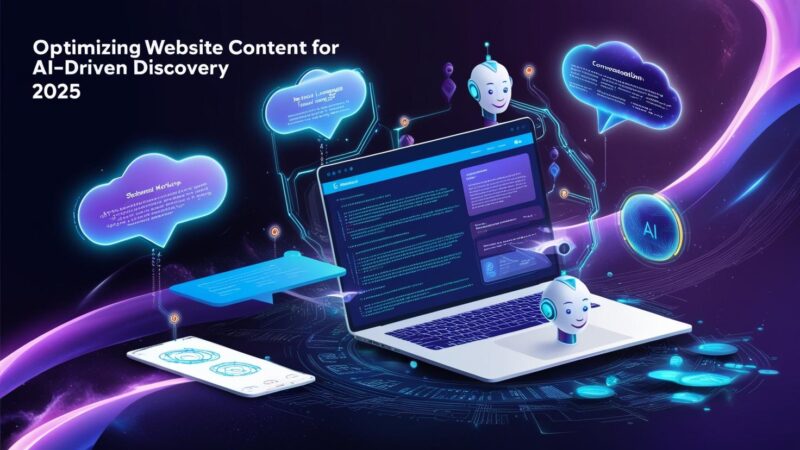
Optimizing Website Content for AI-Driven Discovery in 2025
The way people discover content online is changing rapidly, thanks to the rise of AI tools like ChatGPT, DeepSeek, Grok, and Claude. These conversational AI platforms are reshaping how users search for information, moving away from traditional keyword-based searches toward natural, context-rich interactions.1
For content creators and businesses, this means it is time to rethink SEO strategies to stay visible in this new landscape. This guide breaks down how to optimise your website content for AI-driven discovery, with practical steps you can start applying today.
The Rise of AI-Driven Discovery
Unlike traditional search engines that rely heavily on keywords and backlinks, AI tools pull information from multiple sources and synthesise answers in real time. Users are increasingly using conversational queries such as “What is the best restaurant near me for a business dinner?” instead of typed keyword strings.
A 2024 study by Bloomreach found that businesses using conversational AI tools saw a 69 percent improvement in customer care quality and a 48 percent boost in satisfaction scores.2 The implication for content strategy is significant: if your content cannot be understood and cited by AI systems, it risks becoming invisible.
Use Structured Data and Semantic Markup
AI systems rely on structured data to understand and categorise your content. By adding schema markup using JSON-LD to your website, you can tag important elements such as FAQs, product details, and reviews in a format that AI tools can read and reference directly.3
Start with the basics: add Article, FAQPage, and Person schema to your key pages. These signal authority and relevance to both search engines and AI discovery tools.
Write in a Conversational Tone
AI tools are trained on natural language. Content that reads the way people speak tends to surface more readily in AI-generated responses. Avoid dense, keyword-stuffed paragraphs. Instead, write clear answers to the specific questions your audience is asking.
A practical approach: identify the top ten questions your clients ask you in person, then write a clear, direct answer to each one. These become the building blocks of AI-friendly content.
Leverage AI Tools for Keyword and Topic Research
Tools like SurferSEO, Jasper, and MarketMuse use AI to identify the topics and semantic clusters your content should cover to rank well.4 Rather than optimising for a single keyword, these tools help you build content that comprehensively addresses a subject, which is exactly what AI discovery systems reward.
Build Authority Through Consistent Publishing
AI systems prioritise sources that demonstrate consistent expertise over time. A blog with 50 focused, well-written articles on digital marketing will outperform a site with occasional, broad-topic posts. Consistency and topical depth are the two signals that matter most in an AI-first content environment.5
What This Means for Your Strategy
Optimising for AI discovery is not a separate task from good content marketing. It is the same work done with greater intentionality: clearer writing, better structure, more specific answers, and consistent publishing.
The businesses that invest in this now are building an asset that compounds. Every well-structured article adds to a body of work that AI systems can reference, cite, and surface to the right audiences.
Start with your highest-traffic pages. Add structured data. Rewrite your introductions to answer questions directly. Then build from there.
Sources
SparkToro (2024). Zero-click searches and AI overviews: what the data shows.sparktoro.com
Bloomreach (2024). The state of conversational commerce.bloomreach.com
Google Developers (2024). Introduction to structured data markup.developers.google.com
SurferSEO (2024). How AI content tools improve organic rankings.surferseo.com
HubSpot Research (2024). The state of marketing 2024.hubspot.com
First-party data is information you collect directly from your customers through your own channels: your website, your CRM, your email list, your app. It is the most reliable, privacy-compliant, and strategically valuable data a marketer can have.1
As third-party cookies continue to disappear and privacy regulations tighten globally, the marketers who have built strong first-party data foundations are gaining a significant competitive advantage. Here is what that means in practice.
Why First-Party Data Matters
Unlike second-party or third-party data, first-party data comes directly from people who have already engaged with your brand. That makes it more accurate, more relevant, and far more durable in a privacy-first world.2
Common sources of first-party data include:
Website behaviour such as pages visited, time on site, and click paths
Purchase history and transaction data
Email engagement including opens, clicks, and form completions
Social media interactions with your owned profiles
CRM records from sales and customer service conversations
First-Party vs Third-Party Data
Third-party data is collected by external platforms and sold or shared across multiple advertisers. It has historically powered much of digital advertising, but its reliability and availability are declining fast.3
First-party data, by contrast, is collected with consent, tied to real interactions, and owned entirely by you. It is not affected by browser privacy changes, cookie deprecation, or shifts in platform policy. That ownership is increasingly worth more than any purchased data segment.
How to Use First-Party Data in Your Campaigns
The practical value of first-party data comes from how you activate it. Here are the highest-impact applications:
Audience Segmentation
Use behavioural and transactional data to segment your audience by purchase stage, product interest, or engagement level. Campaigns built on first-party segments consistently outperform generic targeting on both conversion rate and cost per acquisition.4
Lookalike Modelling
Upload your highest-value customer lists to Meta, Google, and LinkedIn to generate lookalike audiences. When your seed audience is built from real first-party signals, the lookalike quality improves significantly compared to modelled third-party data.
Personalised Retargeting
Retarget website visitors, cart abandoners, and past purchasers with messaging that reflects what they actually did on your site. This level of relevance is only possible with first-party data and consistently delivers stronger ROAS than broad prospecting campaigns.
Email and CRM Activation
Your email list is one of your most valuable first-party assets. Marketers who connect CRM data to their ad platforms through Customer Match or Custom Audiences can reach known contacts with coordinated messaging across multiple channels.5
Building Your First-Party Data Strategy
Start by auditing what you already collect and where it lives. Most businesses have more first-party data than they actively use, spread across a website analytics tool, a CRM, and an email platform that are never connected to each other.
The immediate priority is integration: connect your data sources so that behavioural signals from your website inform your email segmentation, and your CRM data feeds your paid media targeting. That single step unlocks a level of campaign precision most competitors are not yet using.
The businesses that treat first-party data as a strategic asset today are building the performance advantage of the next five years.
Sources
IAB (2024). State of data 2024: first-party data and the future of addressability.iab.com
Google (2024). Building for a privacy-first future with first-party data.blog.google
eMarketer (2024). Third-party cookie deprecation and advertiser readiness.emarketer.com
Salesforce (2024). State of marketing: eighth edition.salesforce.com
Meta for Business (2024). Customer Match: connecting CRM data to ad delivery.facebook.com/business
We use cookies to analyse traffic and improve your experience. Learn more
We respect your privacy.
We use cookies to analyse traffic, improve your experience, and personalise content. You can choose which cookies you allow.
By clicking 'Accept All' you agree to our Privacy Policy.
We respect your privacy.
We use cookies to analyse traffic, improve your experience, and personalise content. You can choose which cookies you allow.
By clicking ‘Accept All’ you agree to our Privacy Policy.