

Someone on your team pasted a client brief into ChatGPT this morning. Maybe a pricing sheet. Maybe a list of customer emails.
You didn’t approve it. You probably don’t even know about it.
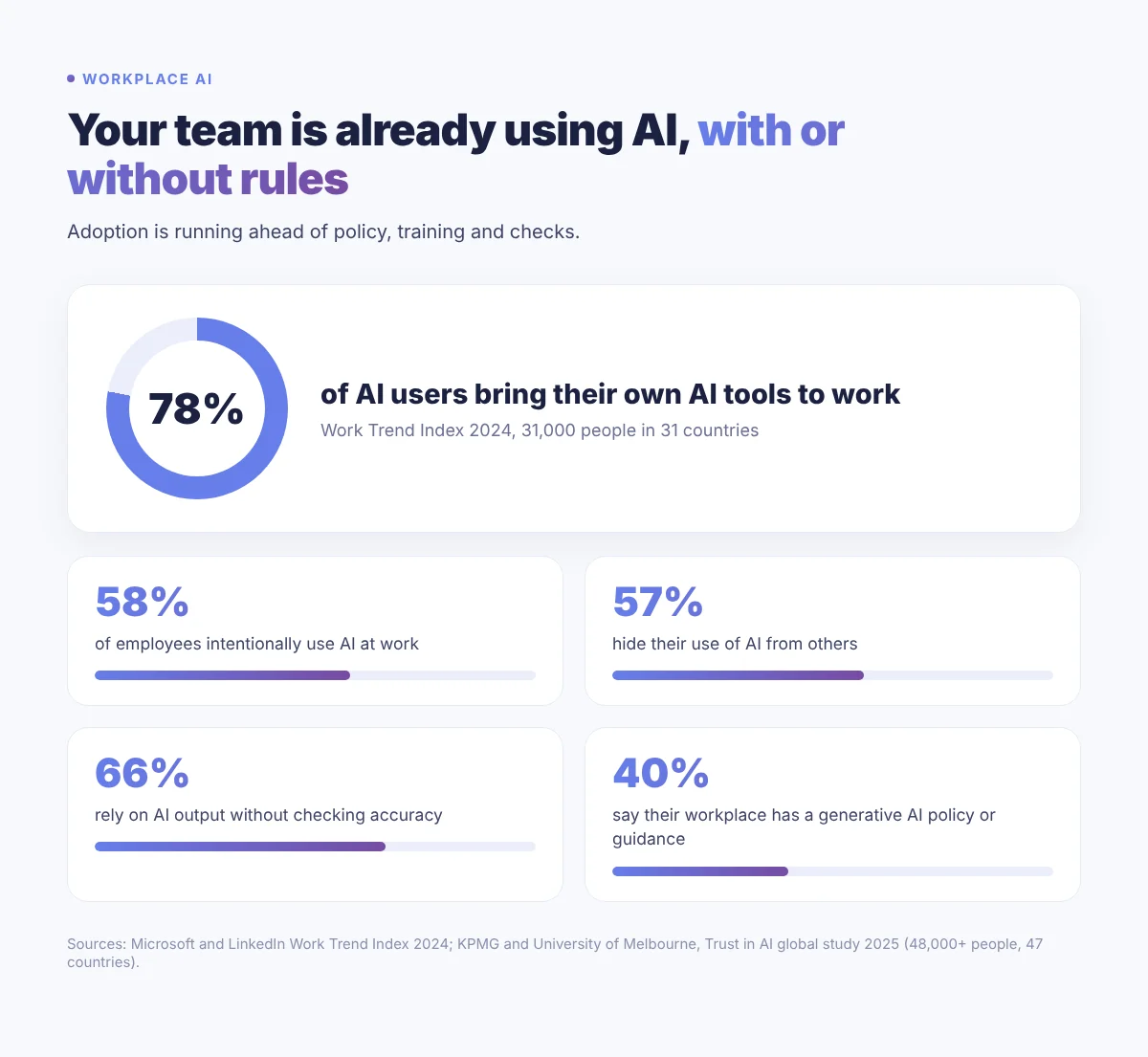
And you’re not alone. According to the Microsoft and LinkedIn Work Trend Index, 78% of AI users bring their own AI tools to work. Meanwhile, a global KPMG and University of Melbourne study found only 40% of employees say their workplace has a policy or guidance on generative AI.
That gap is where the risk lives. In this guide, I’ll show you what the data says and give you a simple five-step framework to build an AI usage policy your team will actually read.
Key takeaways
- 78% of AI users bring their own AI tools to work, often without approval.
- Only 40% of employees say their workplace has a policy or guidance on generative AI.
- 57% of employees hide their AI use, and 66% rely on AI output without checking its accuracy.
- A good AI usage policy is short: approved tools, data rules, ownership of output, one point of contact and a review date.
- Regulation is catching up. AI literacy duties under the EU AI Act already apply, and the Mauritius Data Protection Act 2017 covers any personal data your team pastes into a prompt.
The data: your team is already using AI
AI at work is no longer an experiment. McKinsey’s State of AI 2026 survey found that nearly nine in ten respondents report regular AI use in at least one business function.
But adoption is running ahead of the rules. Here is what the KPMG and University of Melbourne study of over 48,000 people in 47 countries found:
- 58% of employees intentionally use AI at work.
- Almost half admit to using AI in ways that contravene company policies, including uploading sensitive company information into public AI tools.
- 57% hide their use of AI.
- 66% rely on AI output without evaluating its accuracy.
- 56% have made mistakes in their work because of AI.
- Only 47% have received any AI training.
Notice the pattern? People aren’t hiding AI because they’re doing something wrong. They’re hiding it because nobody told them what “right” looks like.
That’s a leadership problem, not a staff problem. And a policy fixes it.
Why “no policy” is still a policy
Without written rules, every employee makes their own decisions about which tools to use, what data to share and whether to check the output. You inherit the risk either way.
Data leaks you never see
Free consumer tools may use your conversations to improve their models unless you opt out. Business tiers are different: OpenAI, for example, states it does not train on business data from ChatGPT Enterprise, Business and its API by default.
Work nobody checked
If two thirds of people rely on AI output without checking it, errors will reach your clients. Ownership of AI-generated material is also unsettled, as WIPO’s guidance on AI and intellectual property shows.
Regulation is catching up
If you serve EU clients, the EU AI Act matters. Its ban on unacceptable-risk AI and its AI literacy duty for staff have applied since 2 February 2025. The Digital Omnibus moved most high-risk obligations to December 2027, but transparency rules started in August 2026.
Here in Mauritius, the Data Protection Act 2017 already applies to personal data your team puts into a prompt. It limits transfers of personal data outside Mauritius and requires breaches to be reported to the Data Protection Commissioner, where feasible within 72 hours.
How to build an AI usage policy in 5 steps
I’ve helped teams put this in place, and the version that works is always the simple one. Here’s the framework.
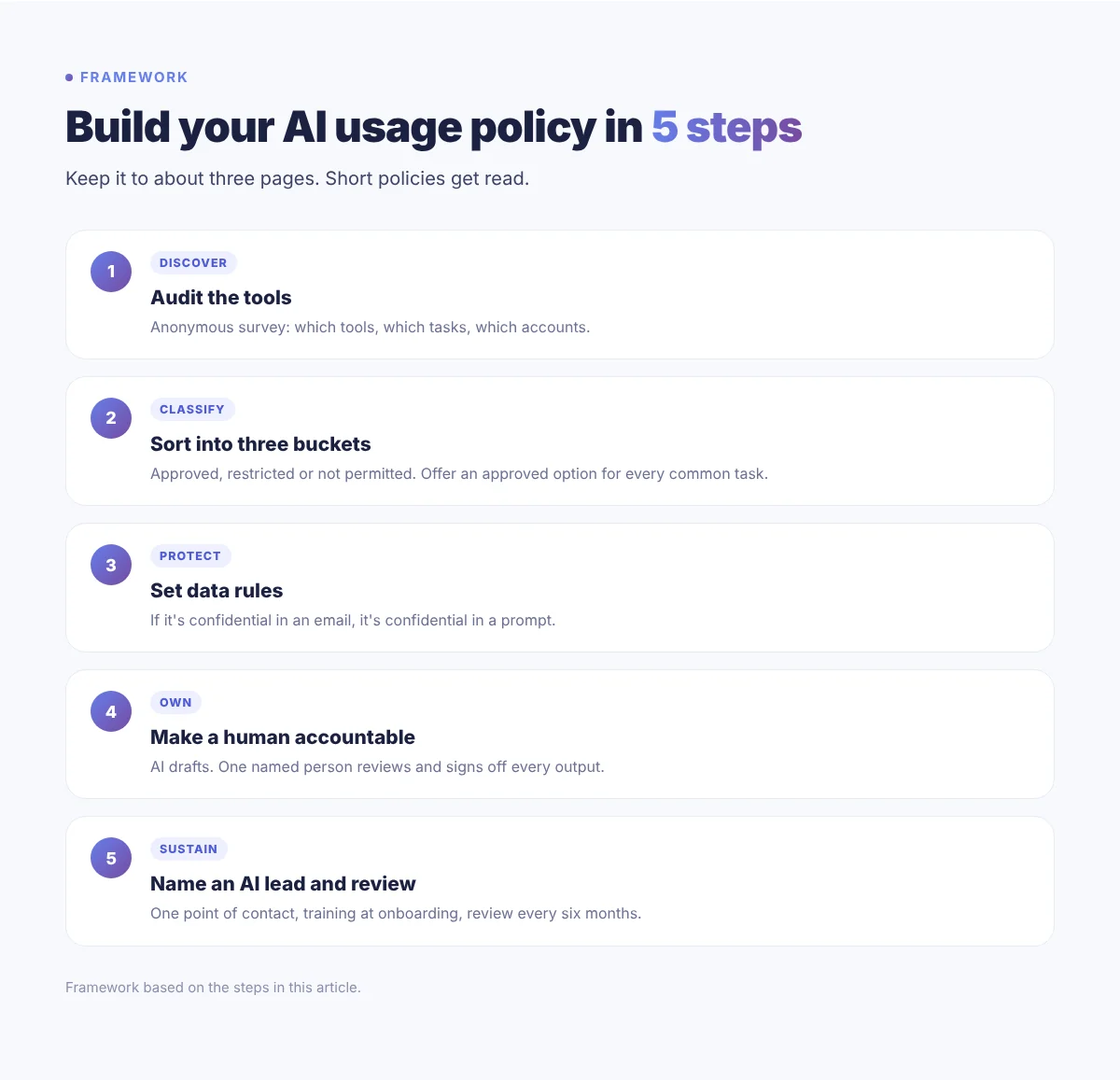
Step 1: Audit the tools people already use
Don’t write rules in the dark. Run a short anonymous survey or have quick one-to-one chats. Ask which tools people use, for what tasks and on which accounts.
Anonymity matters. With 57% of people hiding their AI use, you’ll only get honest answers if nobody feels judged.
Step 2: Sort every tool into three buckets
Use a simple traffic light system:
- Green (approved): business accounts you control, cleared for everyday work.
- Amber (restricted): allowed for public or non-sensitive tasks only, such as brainstorming.
- Red (not permitted): tools with unclear data terms or no business tier.
Give people a green option for every common task. If you only say no, they’ll go back to personal accounts.
Step 3: Set clear data rules
This is the highest-risk area, so keep the rule memorable: if it’s confidential in an email, it’s confidential in a prompt.
- No client names, briefs or campaign data in free-tier tools.
- No HR, financial or customer personal data in any tool without a signed data processing agreement.
- Use approved business tiers for anything sensitive.
If you collect customer data, the same discipline applies to your zero-party data strategy. Trust is easy to lose and hard to win back.
Step 4: Make a human accountable for every output
AI can draft. A person signs off. Every proposal, report or post produced with AI needs one named owner who has reviewed and edited it before it goes out.
This also protects your brand. Content that reads like raw AI hurts credibility, which is why I always push for human-first content.
Step 5: Name an AI lead, train the team and review every six months
Pick one point of contact for AI questions. A department head, your digital lead or the founder. When someone isn’t sure, they ask that person instead of guessing.
Then train people. Only 47% of employees have had any AI training, so a short session puts you ahead. Add the policy to onboarding and review it every six months, because tools change fast. This matters even more as you adopt AI agents that act on your behalf.
A simple AI usage policy template
A 40-page document won’t be read. Aim for three pages. Here’s the outline I recommend:
- Purpose and scope: why the policy exists and who it covers, including freelancers.
- Approved tools: your green, amber and red list, with the accounts to use.
- Data rules: what can never go into a prompt, and which tools are cleared for sensitive work.
- Review and ownership: every AI-assisted output has a named human owner.
- Disclosure: when to tell clients or colleagues that AI was used.
- Requesting new tools: how to propose a tool and who approves it.
- Incidents: what to do if sensitive data was shared, and who to tell straight away.
- Training and review: onboarding, refreshers and the next review date.
Frequently asked questions
What is an AI usage policy?
It’s a short internal document that sets out which AI tools staff can use, what data they can share with them, who reviews AI-generated work and who to ask when they’re unsure.
Do small businesses really need an AI policy?
Yes. Your team is likely already using AI, and 78% of AI users bring their own tools to work. A one to three page policy protects client data and costs very little to create.
Is it safe to put client data into ChatGPT?
Not in a free personal account. Use a business tier whose terms say your data isn’t used for training, and still keep personal or confidential client data out unless a data processing agreement is in place.
How often should an AI usage policy be reviewed?
Every six months as a minimum, and whenever you adopt a major new tool or regulation changes, such as new EU AI Act deadlines.
Conclusion
Your team is already using AI. The only question is whether they’re doing it with guidance or without it.
You don’t need a legal department to fix this. Start this week with a quick audit and a three-page first version, then improve it as you learn.
So here’s my question for you: if I asked your team today which AI tools they use, would you know the answer?
Want to set up AI safely in your business?
I help businesses roll out AI the right way: a clear usage policy, an approved tool stack and automations that save real time. Tell me about your business and I’ll come back to you within 24 hours. Need your team trained? See my digital marketing and AI training.
Sources
- McKinsey: The state of AI in 2026 (1,719 participants, 97 countries)
- Microsoft and LinkedIn: 2024 Work Trend Index (31,000 people, 31 countries)
- University of Melbourne and KPMG: Trust, attitudes and use of AI, global study 2025 (48,000+ people, 47 countries)
- OpenAI: Enterprise privacy
- WIPO: Artificial intelligence and intellectual property
- Gibson Dunn: EU AI Act Omnibus agreement and key dates
- Hunton: EU Digital Omnibus on AI enters into force
- DLA Piper: Data protection laws in Mauritius