
Here’s an uncomfortable truth about bank advertising on Facebook and Instagram.
Most of the people who see your loan or credit card ad have no need for it right now. You’re paying to reach them anyway.
Banking is one of the most expensive, highest-consideration categories on Meta. Nobody opens a current account or takes out a home loan on impulse. So when you target by age, location and a vague “finance” interest, you burn budget on people who were never going to apply.
The fix isn’t a bigger budget. It’s Meta Custom Audiences: targeting people based on what they’ve actually done, like starting an application, using your loan calculator or already banking with you.
In this guide, I’ll show you the exact audience setup I recommend for banks, the five use cases that deliver the lowest cost per approved application, the compliance rules you can’t skip, and a checklist you can use before you go live.
Key takeaways
- Broad demographic targeting is expensive for banks because it ignores intent. Custom Audiences let you pay for people who already showed interest.
- Meta offers three Custom Audience sources: customer lists, website and app activity, and engagement.
- Abandoned application retargeting is usually the cheapest conversion a bank can buy on Meta.
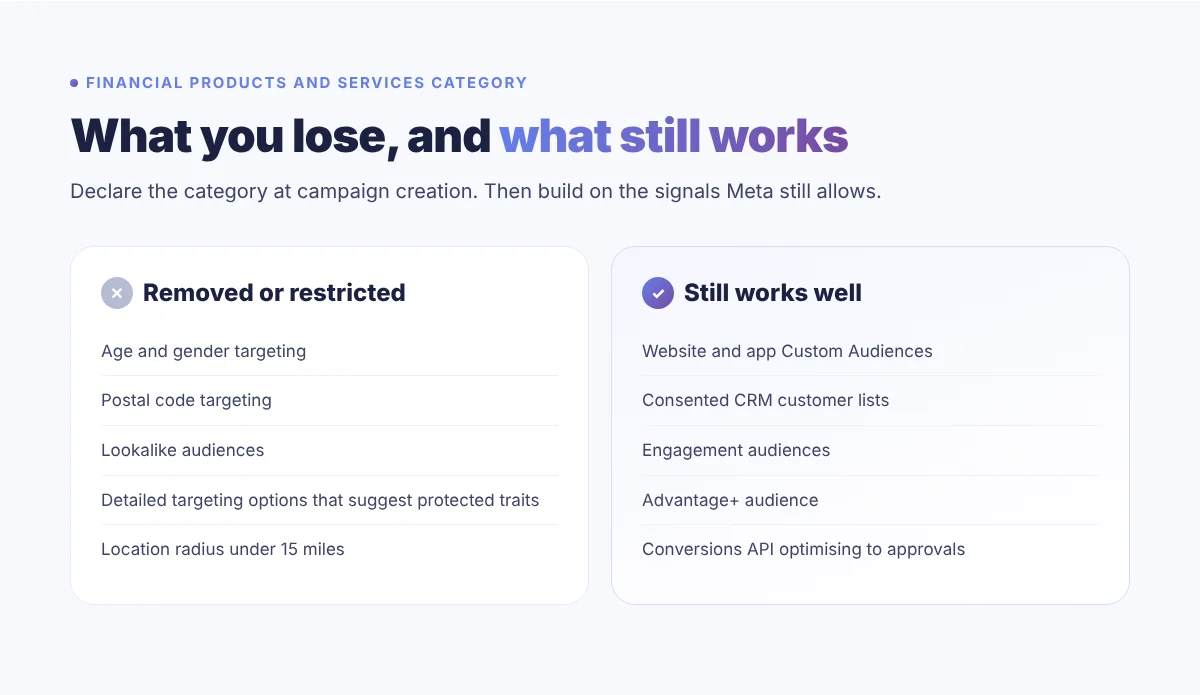
- Ads for loans, cards, accounts, insurance and investments fall under the Financial Products and Services special ad category, which removes age, gender, postcode and lookalike targeting where it applies.
- The Conversions API is the tracking baseline, not an optional upgrade. Without it, Meta optimises toward the wrong signal.
Why generic targeting fails banks
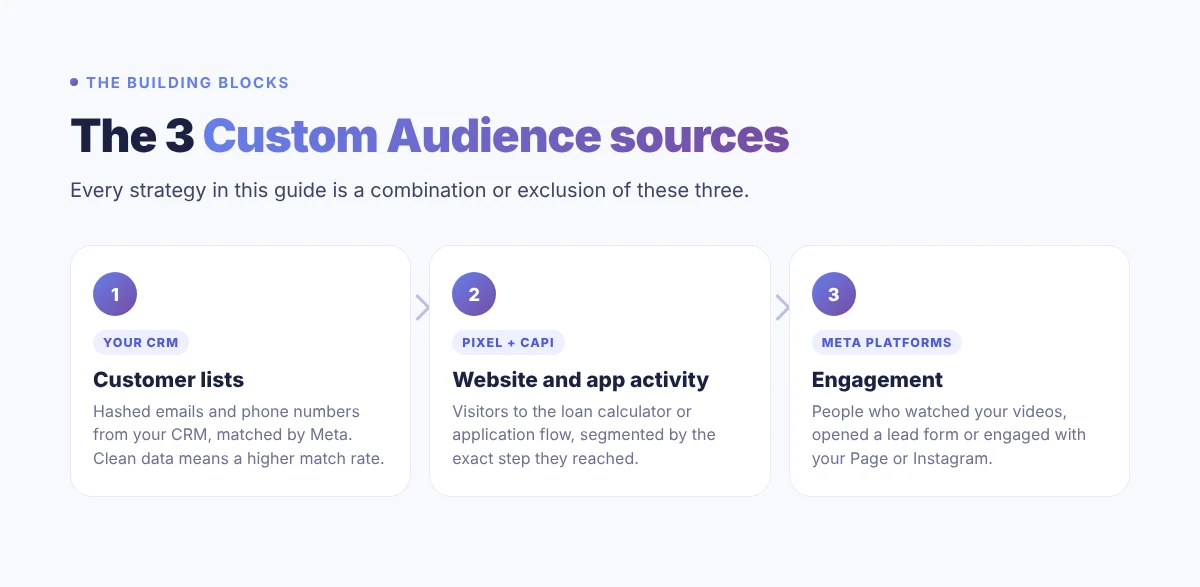
Think about two people who both see your personal loan ad.
The first is 34, lives in the right city and once liked a personal finance Page. That’s all you know.
The second started a loan application on your website yesterday and stopped at the identity check.
Which one would you rather pay to reach?
Demographic targeting treats them the same. Custom Audiences don’t. They let you build campaigns around the difference in intent, instead of guessing at it.
And on a product where the real goal is an approved application, not a click, that difference shows up directly in your cost per customer.
The 3 Custom Audience building blocks
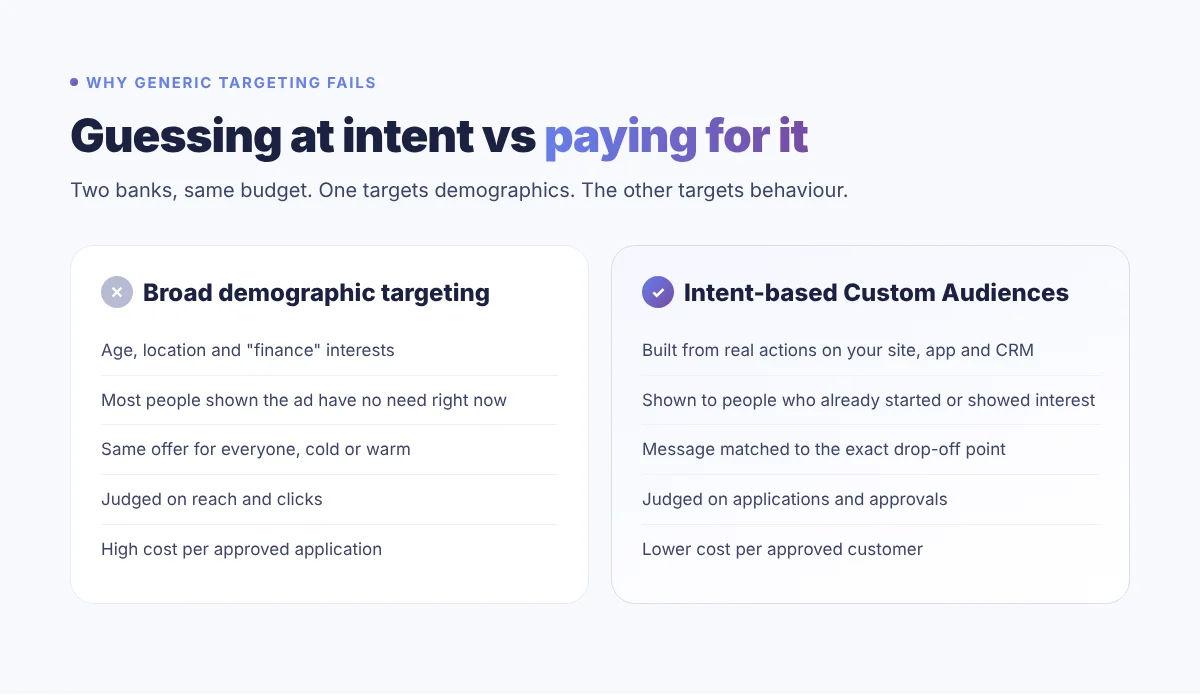
Every strategy in this guide is built from three source types. Get these right first, and everything else gets easier.
1. Customer lists
You upload customer data from your CRM, such as emails and phone numbers. Meta hashes it and matches it against its users. Raw data is never shown on the platform.
Here’s what most banks miss: data quality beats list size. A list of 10,000 recently verified emails will usually outperform 50,000 outdated records, because more of it matches.
So treat your CRM hygiene as a media performance asset, not just an operations task.
2. Website and app activity
These audiences come from the Meta Pixel and, more reliably, the Conversions API. You can target people who visited specific pages, like the loan calculator, or who reached specific steps, like “application started” or “KYC reached”.
The more precisely you tag each step of your application flow, the more precisely you can retarget. Tag only page views and you get one big, vague pool. Tag each step and you can speak to the exact reason someone stopped.
3. Engagement
People who watched your video past a set point, opened a lead form, or engaged with your Facebook Page or Instagram profile.
Someone who watched half of your mortgage explainer has shown far more interest than someone who scrolled past a banner. Segment by engagement depth and you can move people step by step toward an application.
5 high-impact Custom Audiences for banks
These are the use cases I’d prioritise, in this order. The first two alone can cut your cost per acquisition before you build anything more advanced.
1. Abandoned application retargeting
Anyone who started an account opening or loan application but didn’t submit it. This is the highest-intent audience you will ever have on Meta.
They already decided to explore the product. Something stopped them.
Retarget them within seven days with creative that tackles the objection head on:
- “Takes 3 minutes to finish”
- “Check your eligibility with no commitment”
- “Pick up where you left off”
Keep the ad simple and send them straight back to where they stopped.
2. KYC drop-off recovery
These people filled in the first steps, then stopped at identity verification. That drop-off is almost always about anxiety: is my data safe, which documents do I need, how long will this take?
So lead with reassurance, not offers. Show your security and regulatory credentials, list exactly which documents are needed, and say how fast approval is.
3. Pre-approved CRM offers
Upload a hashed list of customers you’ve already pre-approved for a credit product, with their marketing consent.
The credit decision is already made, so this is often your cheapest conversion. The ad isn’t really selling. It’s telling someone they can access something right now. Make it feel like a personal message, not a generic product ad.
4. Cross-sell to existing customers
Target current account holders who don’t yet have a credit card or personal loan, with an existing-customer offer that’s different from your acquisition creative.
One caution: an existing relationship doesn’t exempt you from the special ad category rules. The product you’re promoting decides that. Check with your compliance team before you launch.
5. Lookalikes of your best customers (where allowed)
Seed a 1% to 3% lookalike from your highest-value customers, not your whole base. Customers who have banked with you for years, hold two or more products and use your app will produce a very different lookalike than “everyone registered”.
But here’s the catch: lookalikes aren’t available in campaigns under a special ad category. For credit, loan, account and insurance campaigns where those rules apply, use Advantage+ audience instead and let your Custom Audiences do the heavy lifting.
Map every audience to a funnel stage
Before any audience goes live, give it two things: a funnel stage and a KPI.
Skip this and you’ll make the classic mistake of judging a cold audience by conversion rate, or a retargeting audience by reach. You’ll draw the wrong conclusions from both.
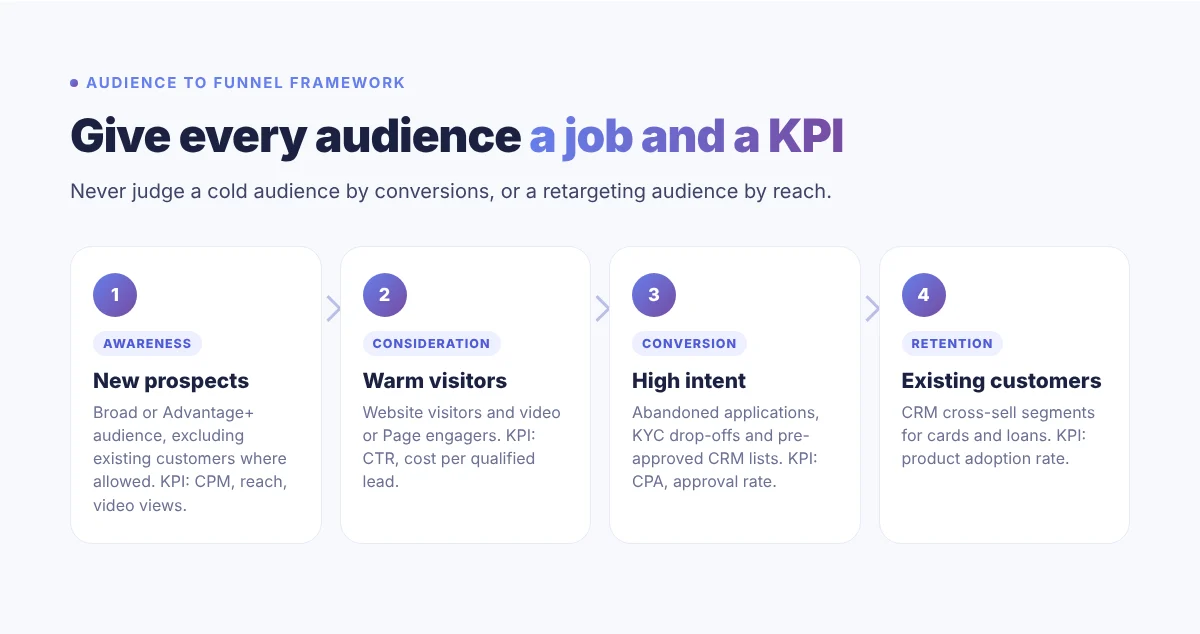
One rule I always follow: never mix funnel stages in the same ad set. Each stage needs its own campaign, creative and success metric.
Compliance: the part banks can’t skip
Financial services face tighter rules on Meta than almost any other advertiser. Get this wrong and you risk rejected ads, restricted accounts and, in regulated markets, fines.
Treat everything below as a go-live gate, not something to fix after launch.
1. Declare the special ad category
Meta replaced its old Credit category with Financial Products and Services. It covers credit cards, loans, financing, bank accounts, insurance, investments and payment services, and became mandatory for these ads targeting the US from early 2025.
Where it applies, declaring it removes age and gender targeting, postcode targeting and lookalike audiences, and requires a minimum location radius of 15 miles.
You must declare it when you create the campaign. You can’t fix it afterwards without rebuilding the campaign from scratch. And because Meta has been widening where these rules apply, check the requirement for every market you target.
2. Hash your data, ideally server-side
Never upload plain-text customer data. Use Meta’s built-in hashing for list uploads, or better, send events server-side through the Conversions API with SHA-256 hashing applied before transmission.
That gives you better match quality, fewer blocked events and a documented server-to-server transfer record, which matters under GDPR, the Mauritius Data Protection Act and similar laws.
3. Respect consent and keep a live suppression list
Only use customer data for Meta advertising where customers have consented under your privacy policy and local law. That’s a legal obligation, not a Meta setting.
Keep a suppression list of everyone who opted out, and sync it every time you refresh an audience. A customer who unsubscribes this month and sees your loan ad next month is a compliance failure and a trust problem.
4. Set a refresh cadence
Refresh uploaded lists every 30 to 90 days, depending on the product and your consent framework. Stale lists mean people who withdrew consent may still see ads, and people who already converted stay in your acquisition retargeting.
Automate this wherever you can. Manual refreshes are where most consent mistakes happen.
Why the Conversions API is non-negotiable
Browser-only Pixel tracking misses a meaningful share of conversions since iOS 14.5 and browser privacy changes. Ad blockers and tracking prevention add to the gap.
For a bank, that’s a bigger problem than bad reporting. Meta’s algorithm learns from the events you send. If it only sees landing page clicks, it finds more people who click. If it sees approved applications, it finds more people who get approved.
That’s why I set up the Conversions API alongside the Pixel, with deduplication, for every financial client. Then I feed offline outcomes, like approved loans and activated accounts, back into Meta so it optimises toward real business results.
Your go-live checklist
Use this before you launch, or to audit an existing setup. Every unticked box either pushes your CPA up, puts your account at risk, or both.
- Install the Pixel and Conversions API on every account opening, loan and card application flow.
- Tag key events: application started, KYC reached, application submitted, application approved.
- Exclude existing customers from acquisition campaigns wherever the rules allow.
- Build an abandoned application retargeting campaign with objection-handling creative and a 7-day window.
- Declare the Financial Products and Services category on every campaign it applies to, before building ad sets.
- Seed lookalikes from your highest-value customers only, and only in campaigns where they’re allowed.
- Set a 30 to 90 day refresh cadence linked to your consent and suppression list.
- Send offline conversions (approved loans, activated accounts) back to Meta.
- Document data transfers and consent records so you’re ready for an audit.
Frequently asked questions
Can banks legally use customer data for Meta Custom Audiences?
Yes, as long as customers have consented to marketing use under your privacy policy and local data protection law, the data is hashed before upload, and you keep an opt-out suppression list in sync. Confirm the consent wording in your customer agreements with your legal or compliance team first.
How big does a Custom Audience need to be?
Meta needs at least 100 matched people for an audience to be usable, but in practice anything under about 1,000 tends to deliver unevenly and struggle to exit the learning phase. For lookalike seeds, Meta recommends 1,000 to 50,000 people. Quality matters more than size.
Does the special ad category hurt performance?
It limits cold prospecting most, because lookalikes, age, gender and postcode targeting are removed. Banks that rely on intent-based Custom Audiences and strong conversion data feel it far less, which is why those audiences become even more valuable under the category.
How often should a bank refresh its Custom Audiences?
Website and app audiences update automatically based on the lookback window you choose. Customer lists need re-uploading or an automated sync. A 30-day cycle is a sensible baseline, with faster updates for abandoned application audiences and the suppression list.
What’s the difference between the Meta Pixel and the Conversions API?
The Pixel is a browser tag, so ad blockers, iOS privacy settings and browser restrictions can stop it firing. The Conversions API sends events from your server directly to Meta. Running both, with deduplication, gives Meta the most complete picture and better optimisation.
The bottom line
Custom Audiences won’t replace your brand campaigns. They make the performance layer underneath them far more efficient.
The banks that win on Meta won’t be the ones with the biggest budgets. They’ll be the ones with the cleanest event data, the most disciplined audience setup and the compliance foundations to scale it safely.
The decisions you make in your first 90 days set your cost structure for years. Get the foundations right before you scale the spend.
Building or auditing your bank’s Meta Ads setup?
I help banks and financial brands set up Custom Audiences, Conversions API tracking and compliant campaigns that lower cost per approved application. Tell me about your project and I’ll come back to you within 24 hours.